Sidebar
The sidebar in Sanity is controlled through the structureTool plugin.
This plugin allows us to create a customized sidebar where we can choose how we display the documents and that allows us to filter lists to show exactly what we want where we want.
This is how our structure looks:
return S.list()    .title('Netwrix')    .items([      ...sections.map((section) =>        S.listItem()          .title(section.title)          .icon(false)          .child(            S.list()              .title(section.title)              .items(                section.items.map((item) => {                  const schemaType = item.schemaType || section.schemaType                  if (item.isDocument) {                    return S.listItem()                      .title(item.title)                      .child(S.document().schemaType(schemaType).documentId(item.id))                  } else if (item.type === 'divider') {                    return S.divider()                  } else {                    return S.listItem()                      .title(item.title)                      .child(                        S.documentList()                          .id(item.id)                          .title(item.title)                          .schemaType(schemaType)                          .filter(item.filter)                          .apiVersion('2023-08-01'),                      )                  }                }),              ),          ),      ),
      S.divider(),      ...])
Basically, we send an array of items with their schema type and any filtering we need and map them out to create subsections in our sidebar.
So our items section looks like this:
export const sections = [ { title: 'Website Pages', items: [ { title: 'Pages', id: 'publishedPages', filter: '_type == "pages"', schemaType: 'pages', }, ], }, { title: 'Customer Stories', items: [ { title: 'Customer Stories', id: 'publishedCustomerStories', filter: '_type == "customer_stories"', schemaType: 'customer_stories', }, {type: 'divider'}, { title: 'Regions', id: 'publishedregions', filter: '_type == "regions_tax"', schemaType: 'regions_tax', }, ], }, { title: 'Cybersecurity glossary', items: [ { title: 'Compliance', id: 'publishedCompliance', schemaType: 'compliance', // Override the section's schema type filter: '_type == "compliance"', }, {type: 'divider'}, { title: 'Cybersecurity Frameworks', id: 'publishedCybersecurityFrameworks', schemaType: 'cybersecurity_frameworks', filter: '_type == "cybersecurity_frameworks"', }, {type: 'divider'}, { title: 'Attack Catalog', id: 'publishedAttackCatalog', schemaType: 'attack_catalogue', filter: '_type == "attack_catalogue"', }, {type: 'divider'}, { title: 'Architectural Concepts', id: 'publishedArchitecturalConcepts', schemaType: 'architectural_concepts', filter: '_type == "architectural_concepts"', }, {type: 'divider'}, { title: 'Security Concepts', id: 'publishedSecurityConcepts', schemaType: 'security_concepts', filter: '_type == "security_concepts"', }, ], }, ...]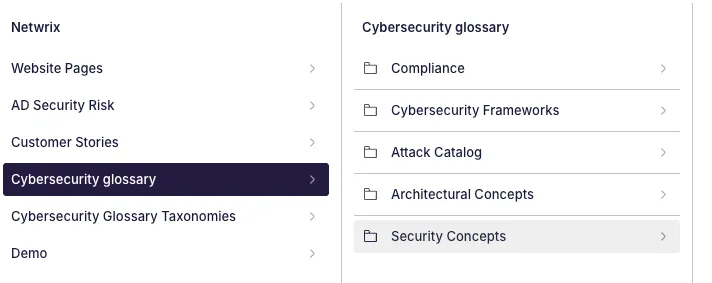
So for each item in our sidebar we get a title, an id, a schemaType and a filter.
We can use a basic type filter or more advanced filtering like:
{ title: 'Demos', id: 'publishedDemos', schemaType: 'demos', filter: '_type == "demos" && parent->_type != "products" && parent->_type != "subproducts"', },