Backend — Sanity to Algolia
From Sanity to Algolia
Section titled “From Sanity to Algolia”Content created in Sanity is automatically synchronized with Algolia based on the backend configuration. Three custom actions manage the full lifecycle of indexed content:
| Action | File | Trigger |
|---|---|---|
| Create / Update | CustomCreateRecordAlgolia.jsx | Publishing or updating a document |
| Delete | CustomDeleteRecordAlgolia.jsx | Deleting a document |
| Unpublish | CustomUnpublishAlgolia.jsx | Unpublishing a document |
Publishing Content
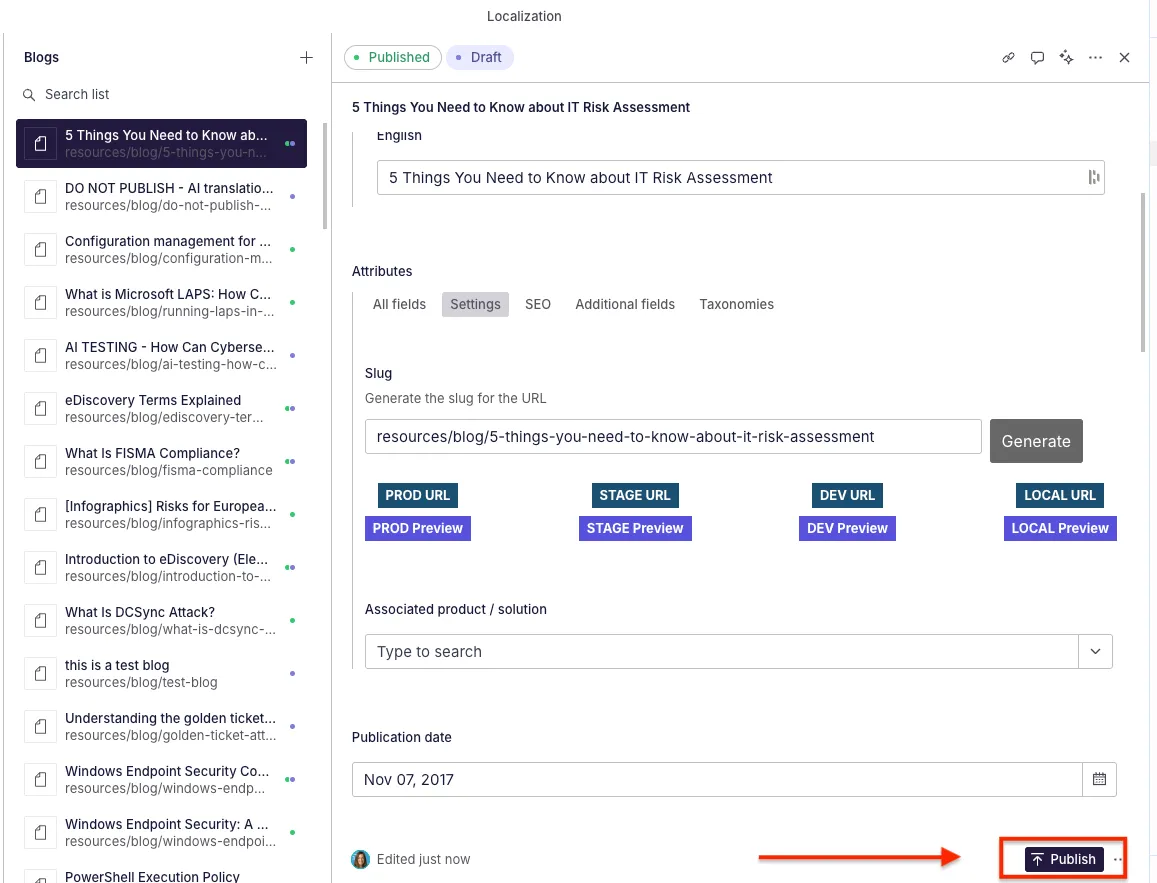
Section titled “Publishing Content”When an item is published in Sanity, the backend triggers the creation or update of the corresponding Algolia record. This ensures that any new or edited content immediately becomes searchable on the live site.
Visual Flow
Section titled “Visual Flow”1. Publishing an item in Sanity:
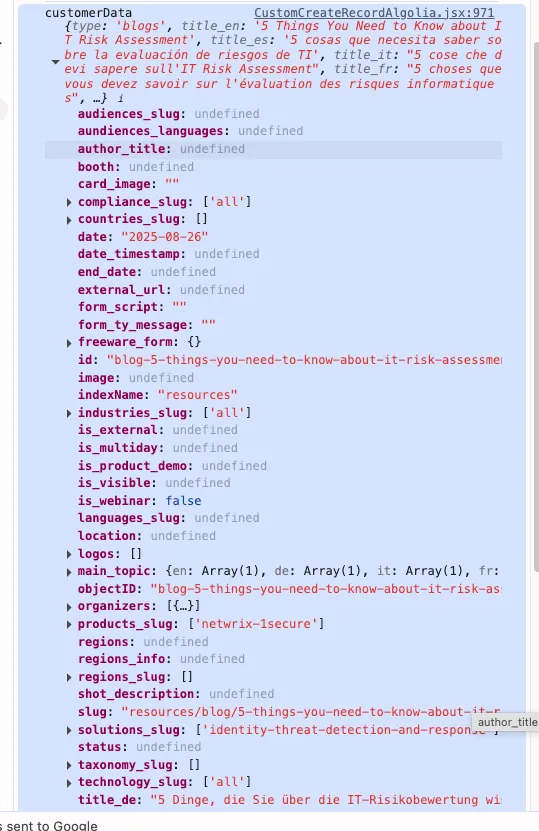
2. Data object sent to Algolia:
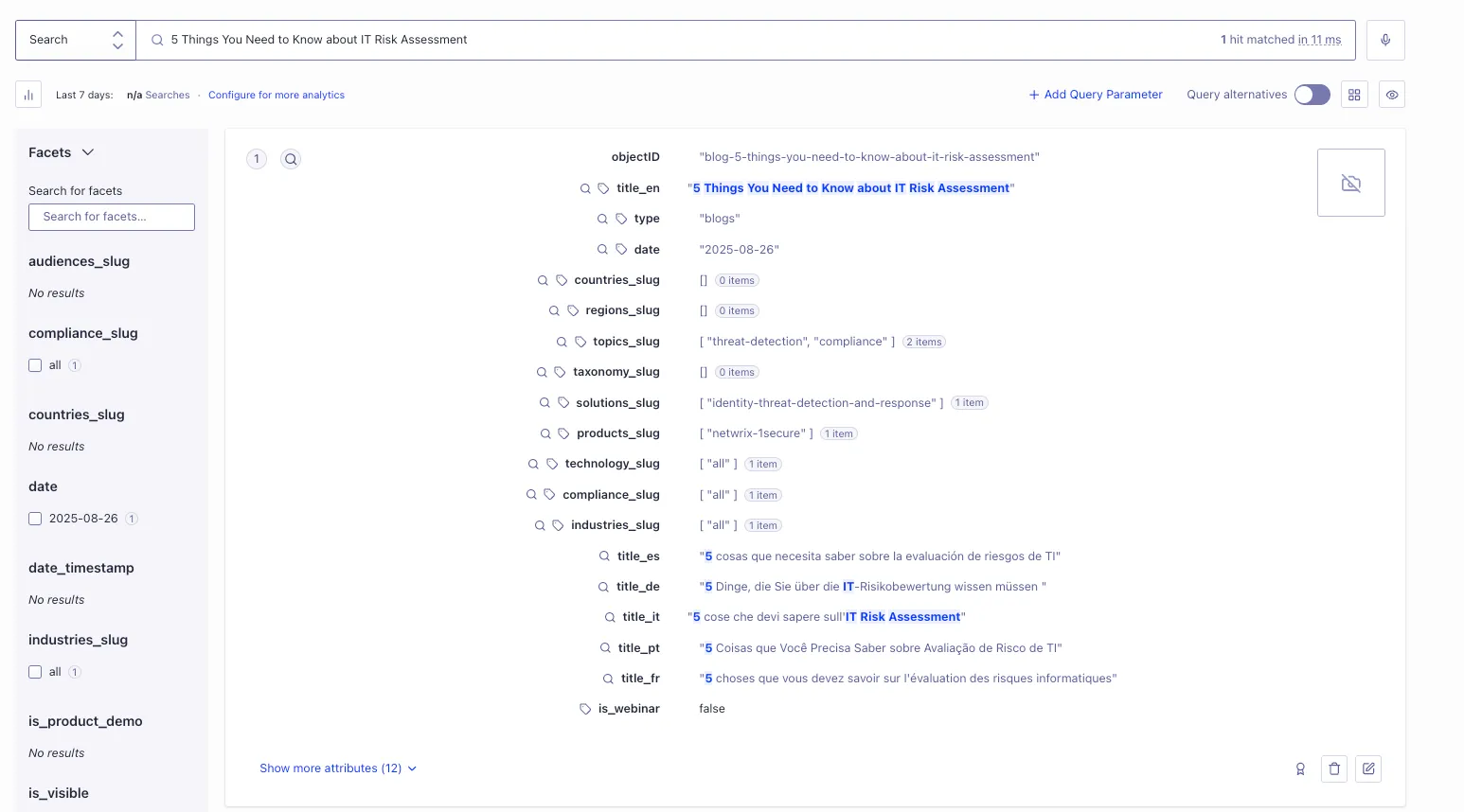
3. Result stored in Algolia:
How Record Creation Works
Section titled “How Record Creation Works”When an item is published:
- The system uses the Sanity document ID as the unique identifier in Algolia (
objectID). - It checks whether a record with that
objectIDalready exists:- Does not exist → a new record is created.
- Already exists → the existing record is updated.
- The system builds an enriched object containing all fields needed to display the content as a card in the Resource Center (title, topics, type, solutions, speakers, slug, publish date, etc.).
This guarantees full alignment between Sanity, Algolia, and the Resource Center.
Index Routing
Section titled “Index Routing”The handlePublish function determines which data builder and Algolia index to use based on the Sanity document type:
const handlePublish = async () => {    if (type == 'customer_stories') {        var customerData = await getCustomerStoriesData(props, client)        indexName = 'customer_stories'
    } else if (        type == 'blogs' || type == 'guides' || type == 'research' ||        type == 'freeware' || type == 'podcasts' || type == 'news' ||        type == 'events' || type == 'webinars' || type == 'publications'    ) {        var customerData = await getResourcesData(props, client)        indexName = 'resources'
    } else if (type == 'partners') {        var customerData = await getPartnersData(props, client)        indexName = 'partners'
    } else if (type == 'ad_security_risk') {        var customerData = await getAdSecurityRiskData(props, client)        indexName = 'ad_security_risk'
    } else if (        type == 'compliance' || type == 'cybersecurity_frameworks' ||        type == 'attack_catalogue' || type == 'architectural_concepts' ||        type == 'security_concepts'    ) {        var customerData = await getCyberSecurityData(props, client)        indexName = 'cybersecurity'
    } else {        indexName = 'global'    }}
Summary of routing:
| Document Type(s) | Data Builder | Algolia Index |
|---|---|---|
customer_stories | getCustomerStoriesData() | customer_stories |
blogs, guides, research, freeware, podcasts, news, events, webinars, publications | getResourcesData() | resources |
partners | getPartnersData() | partners |
ad_security_risk | getAdSecurityRiskData() | ad_security_risk |
compliance, cybersecurity_frameworks, attack_catalogue, architectural_concepts, security_concepts | getCyberSecurityData() | cybersecurity |
| All other types | Default | global |
Record Data Structure
Section titled “Record Data Structure”Each record sent to Algolia contains the fields needed for search, filtering, and card display. Here is an example for a Blog record:
var customerData = { type: "blogs", slug: "resources/blog/5-things-you-need-to-know-about-it-risk-assessment", id: "blog-5-things-you-need-to-know-about-it-risk-assessment", title_en: "5 Things You Need to Know about IT Risk Assessment", title_es: "5 cosas que debes saber sobre la evaluacion de riesgos de TI", title_fr: "5 choses a savoir sur l'evaluation des risques informatiques", title_de: "5 Dinge, die Sie uber IT-Risikobewertungen wissen sollten", title_it: "5 cose da sapere sulla valutazione del rischio IT", title_pt: "5 coisas que voce precisa saber sobre avaliacao de risco de TI", topics_slug: ["threat-detection", "compliance"], solutions_slug: ["identity-threat-detection-and-response"], publish_date: "2025-11-10T00:00:00Z", last_modified: "2025-11-18T00:00:00Z", organizers: { title: "Netwrix Team", image: "https://cdn.sanity.io/images/.../150x150.jpg", },}The record is then sent to Algolia via a Netlify function:
try { await axios.post('https://netwrix.com/.netlify/functions/create-algolia-record', { data: customerData, })} catch (error) { console.error(error)}Each record also includes general identifiers:
slug = props.draft?.attributes?.slugindexName = indexNameid = idobjectID = idFor detailed field descriptions per content type, see the Backend sub-pages:
Deleting or Unpublishing Content
Section titled “Deleting or Unpublishing Content”When an item is deleted or unpublished:
- The system locates the record in Algolia using the Sanity document ID (
objectID). - The corresponding Algolia record is removed from the index, ensuring outdated content does not appear in search results.
Unpublish a Record
Section titled “Unpublish a Record”export default async function CustomUnpublishAlgolia(props) { var indexName = 'resources';
try { let response = await axios.delete( 'https://netwrix.com/.netlify/functions/delete-algolia-record', { data: { objectID: props.id, // Sanity document ID indexName: indexName, // Target Algolia index } } ); return response.data; } catch (error) { return null; }}Delete a Record
Section titled “Delete a Record”export default async function CustomDeleteRecordAlgolia(props) { var indexName = 'resources';
try { let response = await axios.delete( 'https://netwrix.com/.netlify/functions/delete-algolia-record', { data: { objectID: props.id, // Sanity document ID indexName: indexName, // Target Algolia index } } ); return response.data; } catch (error) { return null; }}Both actions use the same Netlify function endpoint (delete-algolia-record) and differ only in the trigger context within Sanity.