AI Translation
Translation in the backend is managed directly via AI. We have integrated Netwrix´s OpenAI agents to source the translations.
We have three actions:
- One action translates the whole document, rewriting even the translations that were already present
- One action translates only missing fields, so only blank fields in the language(s) meant to be translated
- The last action is associated to each field itself, but it is mostly limited by how much Sanity allows us to access
We are going to explain only the main DocumentTranslate.jsx action, because it encompasses all helpers that are used in the other two actions and it has the same overall structure as them, so understanding this one leads to understanding how the other two work.
Activating the action
Section titled “Activating the action”Both document translation actions are included in the document action list in sanity.config.js
document: {    actions: (prev, context) => {      // Algolia-specific types      const algoliaTypes = [        ...      ]
      // For Algolia types: Replace publish/delete actions      if (algoliaTypes.includes(context.schemaType)) {          ...
        return [          CustomCreateRecordAlgolia,          CustomUnpublishAlgolia,          ...remainingActions,          CustomDeleteRecordAlgolia,          DocumentTranslate,          DocumentTranslateMissing,        ]      }
      // For all other types: Just add translate actions      return [        ...prev,        DocumentTranslate,        DocumentTranslateMissing,      ]    },}
So we add them to the existing document actions.
We cannot include them in the top document bar (where the Sanity AI’s default translate action was) because of limitations in accessing Sanity’s UI.
The action itself
Section titled “The action itself”This is a very long file but it’s divided into sections and uses numerous helpers from other files to be more legible.
Dialog
Section titled “Dialog”First thing the action does is opening a dialog that will prompt the user to choose which language they want to use as a base language and into which languages they want to translate the text.
This is done through the dialog that Sanity offers for its document actions, so when we make the return statement for our action, we need to include that dialog component in there.
return { label: 'Translate Document', onHandle, dialog: openDialog ? {type: 'custom', component: <DialogComponent />} : null, }This dialog will receive our translateDocument function as a prop and it can return to it the chosen languages:
  const handleConfirm = (languages) => {    translateDocument(languages)  }
const DialogComponent = () => ( <TranslationDialog onClose={() => setOpenDialog(false)} onConfirm={handleConfirm} /> )export const TranslationDialog = ({onClose, onConfirm}) => { const [fromLang, setFromLang] = useState('en') const [toLangs, setToLangs] = useState(languages.filter(lang => lang.id !== 'en').map(lang => lang.id)) const allLangs = languages.map(lang => ({code: lang.id, label: lang.title}))
const toggleLang = (code) => { setToLangs((prev) => (prev.includes(code) ? prev.filter((l) => l !== code) : [...prev, code])) }
return ( ... )}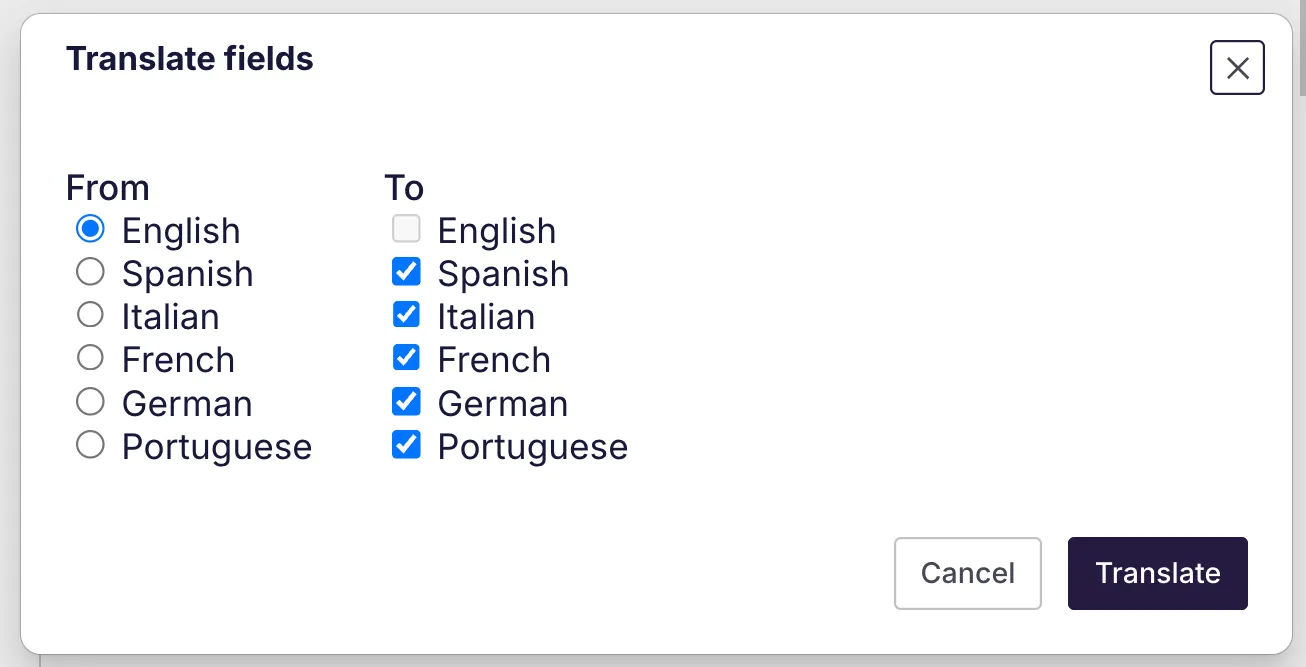
So we saw in the return statement above when we were setting up our document action, that we have an onHandle function. This is what Sanity executes actually when executing the function, so it would go to:
const onHandle = () => { setOpenDialog(true) }The dialog opens, we select languages and then we go into our translateDocument proper, where the translation actually starts.
First thing we do is closing the dialog and setting our loading state to true.
  const translateDocument = async ({fromLang, toLangs}) => {    setOpenDialog(false)    setLoading(true)
    devLog('🟢 Translating from', fromLang, 'to', toLangs)...  }
Translatable fields
Section titled “Translatable fields”Then we extract our translatable fields, and for that we use our first helper function. This will identify all fields that, by their structure, are deemed as translatable, which would be fields that contain an object with language keys inside, like:
'title': { 'en': 'This is a title', 'es': 'Esto es un título' ...}This is a recursive method that will extract translatable fields even if they are deeply nested.
After extracting them, it determines which fields need to be translated from all the fields it found. So for this action, all fields need to be translated, because we are translating the whole document.
If we were in the missing fields action, we would here filter and get only the fields that are empty.
    try {      const {draft, published} = props      const rawFields = draft || published      const docId = rawFields._id
      const allFields = extractTranslatableFields(rawFields)      const untranslated = allFields      if (!untranslated.length) {        devLog('✅ Nothing to translate.')        setLoading(false)        return      }      ...    }
Portable text
Section titled “Portable text”When all of this is done, we can start with the portable text party.
Portable text consists of deeply nested arrays that contain a lot of formatting information about the text itself, and on top of that we have a bunch of custom blocks that are included in our portable text editor, so we need to account for them.
const simplified = flattenPortableText(untranslated, fromLang)And our flatten helper will find out what type of block we are dealing with and strip it to its most basic elements so we can send it to be translated.
In our helper we’ll basically match every block with its helper function, that will determine if the block’s elements have text that needs to be added to the flattened array. So this is the first of our four helper functions present in each block file.
But there’s also another helper here, inside toSlimBlocks, that comes from our block file and will transform the block from its complex form into the plain object we need to send to the AI.
export const flattenPortableText = (untranslated, fromLang) => { const simplified = untranslated   .flatMap(({path, object}) => {     ...
     // CASE 2: Portable Text → split into individual blocks for parallel translation     if (Array.isArray(source) && source.some((b) => b && (b._type === 'block' || b._type === 'text_links' || ...))) {       const slim = toSlimBlocks(source)
       // Split into individual blocks that have translatable text       const blockResults = []       for (const slimBlock of slim) {         let hasText = false         if (slimBlock._type === 'block') {           hasText = slimBlock.children.some((c) => c.text && c.text.trim())         } else if (slimBlock._type === 'text_links') {           hasText = hasTextLinksTranslatableText(slimBlock)         }         ...         if (hasText) {           blockResults.push({             path: [...path, {_key: slimBlock._key}],             object: {               [fromLang]: [slimBlock],             },             isPortableTextBlock: true,             parentPath: path,           })         }       }
       return blockResults     }
     // Other shapes: skip for now (or extend later)     return []   })
return simplified}Translating using the AI
Section titled “Translating using the AI”Once we have all our text prepared to be translated, the first thing we need to do is chunking it to optimize translation times:
// Each field becomes its own chunk for individual translation const chunks = simplified.map(field => [field])For our chunking, since we have potentially long portable text blocks, we decided on chunking each field on its own, so we make more calls but our calls are short and to the point.
We get all our keys from our environment variables and first thing we do is fetching our translation style guide from Sanity, since it’s open for the users to better capture Netwrix’s style:
      const OPENAI_URL = import.meta.env.SANITY_STUDIO_OPEN_AI_URL      const OPENAI_KEY = import.meta.env.SANITY_STUDIO_OPEN_AI_KEY      const OPENAI_MODEL = import.meta.env.SANITY_STUDIO_OPEN_AI_MODEL
      // Fetch translation style guide from Sanity      let styleGuide = ''      try {        const translationSettings = await client.fetch(`*[_type == "translation"][0].translation_style_guide`)        styleGuide = translationSettings || ''        if (styleGuide) {          devLog('📝 Using translation style guide')        }      } catch (err) {        devWarn('⚠️ Could not fetch translation style guide:', err)      }
Then we need to actually fetch the translation from OpenAI for each of our chunks, so we can map them and act on each of them. We’ll make a POST query to our agent and we’ll send our prompt with it:
      const tasks = chunks.map((chunk, index) => async () => {        devLog(`🧠 Translating batch ${index + 1}/${chunks.length}...`)
        // Step 1: Get translation from AI        const response = await axios.post(          OPENAI_URL,          {            model: OPENAI_MODEL,            messages: [              {                role: 'user',                content: getSystemPrompt(fromLang, toLangs, chunk, styleGuide),              },            ],            temperature: 0.3,            max_tokens: 8000,          },          {headers: {            "Content-Type": 'application/json',            "Ocp-Apim-Subscription-Key": `${OPENAI_KEY}`}},        )
devLog(response.data) let content = response.data.choices[0].message.content.trim() content = content.replace(/```json|```/g, '').trim() devLog(content) ... })Once our agent returns the translated objects, we can clean them up and proceed to the patching into Sanity, but first, this action is actually ran in batches of ten translations:
await runBatched(tasks, 10, (current, total) => { const percentage = Math.round((current / total) * 100) // Update the progress toast toast.push({ id: progressToastId.current, status: 'info', title: 'Translation in progress', description: `${percentage}% complete`, duration: 999999, }) })So we have a helper to aid us in batching these translations, and we’ll make ten parallel calls (you can change this frequency from the function) to our agent before continuing with our way, and we’ll update our progress toast while we do this.
Patching into Sanity
Section titled “Patching into Sanity”Patching would be simple except for our Portable Text, so we need another helper to handle this:
try {          const translated = JSON.parse(clean)          devLog(`✅ Batch ${index + 1} translated (${translated.length} items)`)
          // Step 2: Immediately patch this batch to Sanity          devLog(`💾 Patching batch ${index + 1}/${chunks.length}...`)          await patchTranslatedBatch({            translated,            client,            docId,            allFields,            toLangs,            fromLang,          })          devLog(`✅ Batch ${index + 1} committed to Sanity`)        } catch (err) {          devError(`⚠️ Error processing batch ${index + 1}:`, err)          throw err        }
This helper called patchTranslatedBatch will get each translated object, check if it is portable text or a regular field, and:
- If it is a regular field, patch it using the field’s key
- If it is portable text, determine if it’s a regular block and patch it using the key, or if it’s a custom block, in which case it will make use of
applySlimTranslationto determine which block is it and how it needs to re-hydrate it. This will make use of the last of our four block methods, in charge of reconstructing that block to its original form and adding the translated text into it.
Finish
Section titled “Finish”And that is mostly it, to clean up we need to update our toast until we don’t need it anymore and complete our action:
if (progressToastId.current) {        toast.push({          id: progressToastId.current,          status: 'success',          title: 'Translation complete!',          description: 'All selected languages have been updated.',          duration: 4000,        })        progressToastId.current = null      } else {        toast.push({          status: 'success',          title: 'Translation complete!',          description: 'All selected languages have been updated.',        })      }
      devLog('🎉 Translations complete!')
Reloading the page
Section titled “Reloading the page”Since our translation runs in batches, the progress that was finished before reloading the page will be conserved, because those fields will already be patched into Sanity, but the translation will need to be ran once again to finish it, because it will have stopped with the reload.