Marketo integration
To integrate Marketo forms efficiently, we use a handler class that instantiates them only when necessary, as to not crowd the HTML with unnecessary elements and / or scripts.
This is scripts/handler/Marketo/Handler.js.
This Handler has X parts that will execute to embed the forms in the page and be able to inject behaviour before, during and after form submission.
📦 Form embedding
Section titled “📦 Form embedding”👩🏻💻 Scripts
Section titled “👩🏻💻 Scripts”The scripts for the forms are stored in Sanity, and each form is assigned a thank you message:
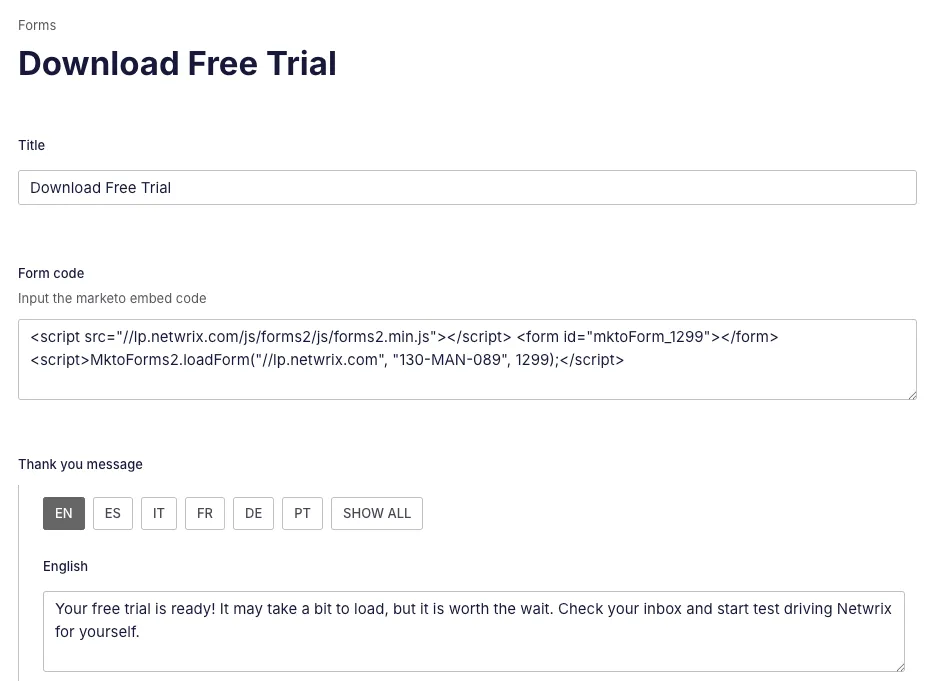
This script is sent via query to our front-end and appended to a HTML element that will be picked up by our class:
<div class=`${download_link ? ' js--marketo-embed-download' : ' js--marketo-embed'} ${is_subscription_center ? 'c--form-b' : 'c--form-a' }` data-thank-you={form_thank_you && form_thank_you.trim()} data-redirect-link={redirectUrl && redirectUrl} data-lang={language} data-download={download_link} data-form={ form_script } data-filename={download_filename} data-product-code={product_code} data-subscription-thank-you={subscription_thank_you} data-is-sub-center={isSubCenter}></div>Here we can see that we have several data- attributes that will send information to our handler, but the one that is important to us now is the data-form one, that contains the script.
That script looks like this:
<script src="//lp.netwrix.com/js/forms2/js/forms2.min.js"></script><form id="mktoForm_1299"></form><script> MktoForms2.loadForm("//lp.netwrix.com", "130-MAN-089", 1299);</script>So we have three parts: a main script first, that will control all Marketo forms in the page and that needs to be present for any form to render, a form element with an ID and a second, concrete script, that will load that form specifically in the form element with the corresponding ID.
We control the execution of these scripts in our handler.
First, we load the main script once:
async loadMainScript() { if (!this.mainScriptPromise) { this.mainScriptPromise = this.boostify.loadScript({ url: "//lp.netwrix.com/js/forms2/js/forms2.min.js", appendTo: "head", attributes: ['data-no-delete=""'], }); } return this.mainScriptPromise; }And then, we load our concrete script. Here, we check if the form is already loaded to avoid repetition, we get the form script itself and we use our extractMktoParts helper to separate it into main script, form element and concrete script. We then get the concrete script and load it via boostify and add a formId attribute so we can properly destroy forms after we stop needing them (as in when we close a modal):
async loadConcreteScript({ form, config }) { try { if (form.querySelector("form.mktoForm")) { console.warn(`Marketo form already loaded in`, form); return; } // Get the script from the data-form attribute (comes from the backend) const formScript = form.getAttribute("data-form"); // Separate the parts of the script if (formScript) { const cleanScripts = this.extractMktoParts({ html: formScript, config }); // Add the form inside the element form.innerHTML = cleanScripts.form; // Add the form ID to be able to delete the scripts later on when necessary form.setAttribute("formId", cleanScripts.formId); // Load the script itself if (cleanScripts.scriptContent && cleanScripts.formId) { await this.boostify.loadScript({ inlineScript: cleanScripts.scriptContent, attributes: [`formId=${cleanScripts.formId}`, 'data-no-delete=""'], }); this.loadCheckboxes(); } } } catch (error) { console.error(error); } } extractMktoParts({ html, config }) { const container = document.createElement("div"); container.innerHTML = html.trim();
let scriptSrc = ""; let form = ""; let scriptContent = ""; let formId;
for (const el of Array.from(container.children)) { if (el.tagName === "SCRIPT" && el.src) { // Discard first script, as it is the main script that we load separately scriptSrc = el.src; } else if (el.tagName === "SCRIPT") { // Get the content script as is const raw = el.textContent.trim(); // Clean up the end (take out the parenthesis and the semicolon to be able to add more information inside) scriptContent = raw.endsWith(";") ? raw.slice(0, -2).trim() : raw; // Extract form ID formId = scriptContent.split(",")[2].trim(); // Add information scriptContent = scriptContent + config; } else if (el.tagName === "FORM") { // The form tag form = el.outerHTML; } } return { scriptSrc, form, formId, scriptContent }; }Each of these methods will be called in our events() method, where we will control the rendering of each form separately.
🗂️ Form types and configurations
Section titled “🗂️ Form types and configurations”We have these types of forms:
- Regular form, displays thank you message at the end, does nothing else (might redirect)
- Downloadable form, displays thank you message and triggers a file download that opens in a new tab, might also redirect afterwards
- Webinar form, used for on demand webinars and podcasts, redirects to a thank you page
- Webinar form with registration, used for upcoming and recurring webinars, triggers a registration in external platform after submitting, reloads the page when it is done
- Same two options for webinar series, because they need to either redirect or trigger several registrations in bulk
- CTA in resources center, comes from Algolia, very simplified version because it does not need to do anything else than submitting
- Footer form, special case because it is outside of the SPA scope, i.e. does not change on page transition, so it is loaded only once and it stays there
For each of these we have a configuration in our class constructor. We will use these configurations to create instances of each of the forms in the moments that we need them.
So our regular configuration, for instance, would be as follows:
this.config = ({    thank_you,    redirect,    language,    productCode,    mainProductCode,    subscriptionCenterThankYou,    isSubCenter,    pageTitle,    preFilledValues,}) => `, async (form) => {            form.setValues({Language: ${language}});            ${this.prefill}
            // This is only for subscription center, prefill all values            if(${isSubCenter}){                form.setValues(${preFilledValues})            }
            MktoForms2.whenReady(function(form) {                ${this.translate}                ${this.addReferrer}            })
            ${this.validate};
            form.onSubmit(() => {                if(${productCode} && ${productCode} != undefined && ${productCode} != 'undefined') {                    form.addHiddenFields({"Product__c":${productCode}})                } else if(${mainProductCode} && ${mainProductCode} != undefined && ${mainProductCode} != 'undefined') {                    form.addHiddenFields({"Product__c":${mainProductCode}})                }                if(${pageTitle} && ${pageTitle} != undefined && ${pageTitle} != 'undefined'){                    form.addHiddenFields({"pageTitle":${pageTitle}})                }            })
            form.onSuccess(() => {                const values = form.getValues()                ${this.savePrefills}
                const formElement = form.getFormElem()[0];                if(values.Unsubscribed == 'yes') {                    formElement.innerHTML = '<p class="c--form-success-a">${subscriptionCenterThankYou}</p>';
                } else {                    formElement.innerHTML = '<p class="c--form-success-a">${thank_you ?? ""}</p>';                }
                ${this.pushToGTM}
                if(${redirect}) {                    window.location.href = ${redirect}                }
                const formParent = formElement.parentElement;                if(document.querySelector(".js--demo-form") && document.querySelector(".js--demo")) {                    document.querySelector(".js--demo-form")?.classList.add("u--display-none");                    document.querySelector(".js--demo")?.classList.remove("u--display-none");                    document.querySelector(".js--demo-footer")?.classList.add("u--display-none");                }
                const previousElementSibling = formParent?.previousElementSibling;                if (previousElementSibling?.classList.contains('js--form-title')) {                    previousElementSibling.classList.add('u--display-none');                }
                return false;                });            })`;
Notice that all of it is interpolated, that is because for us to append functionality to the form, we need to pass it to the concrete script. So we are really appending all of this configuration to the end of that concrete script we saw at the beginning.
It is also important to note that we cannot use regular this functions here if we need to pass one parameter from our interpolated values and another parameter from inside the interpolated string, so for instance if I wanted to use the form from async (form) I would not be able to do that with a regular function because I would be using it through interpolation, so we need to send all functions to the window to be able to use them as we want.
Here we perform several actions:
- We prefill values (email, first name, last name) using our localStorage and our preFill helper:
this.prefill = `            const preFilledEmail = localStorage.getItem('userEmail');            const preFilledFirstName = localStorage.getItem('userFirstName');            const preFilledLastName = localStorage.getItem('userLastName');
if (preFilledEmail) { form.setValues({ Email: preFilledEmail }); } if (preFilledFirstName) { form.setValues({ FirstName: preFilledFirstName }); } if (preFilledLastName) { form.setValues({ LastName: preFilledLastName }); } `;- We translate and add referrer to our form in the
whenReadymethod from the Marketo form API.
The translations are stored in a JSON in a hidden field in Marketo and we use a script present in scripts/handler/Marketo/translations.js to apply them depending on the language we are viewing the site in.
The referrer we add through another mini-helper:
this.addReferrer = `           var ref = document.referrer || '';           if (ref) {               var a = document.createElement('a');               a.href = ref;               ref = a.hostname.replace(/^www\./, '');           }
form.addHiddenFields({"Last_Referrer__c": ref || "direct"}); `;- We validate the form against a list of competitor domains that are not allowed to submit the form:
this.validate = ` form.onValidate(() => { const values = form.getValues(); const email = values.Email?.toLowerCase().trim(); const competitorDomains = ${JSON.stringify(emails)}; const isCompetitor = competitorDomains.includes(email) || competitorDomains.some(domain => email.endsWith(domain)); // List of competitor domains if (isCompetitor) { form.submittable(false); form.showErrorMessage("This email address is not allowed", form.getFormElem().find("#Email")); return false; } else { form.submittable(true); } }) `;-
On submit, we add hidden fields to the form. In this case, we add a product code, either from the form itself or from the whole page, and we add the page title too. These are needed to create the leads properly in Marketo and Salesforce.
-
On success, we save our prefills for next form fills, we display the thank you message we had stored in Sanity, we push our form fill to GTM using a helper, we redirect if needed and we delete the title from the modal.
-
In the end, we
return falseto stay in the same page and not trigger the page reload that Marketo does automatically.
This would be the base case, then, for downloadable forms, we would add this to our onSubmit part to bring the asset title to Marketo for mailing purposes:
if(${assetName}) { form.addHiddenFields({"assetName":${assetName}}) }And this to our onSuccess method to open the download in a new tab and add a safety message to go directly to the link it case it did not open:ƒ
window.open("${href}", "_blank");formElement.insertAdjacentHTML( "beforeend", "<p>If your download has not started, click <a target='_blank' href=${href}}>here</a>.</p>");⏳ Events where we instantiate the forms
Section titled “⏳ Events where we instantiate the forms”So each of these configs will be used in our events() method. For us to instantiate these forms, we need to know when we need to do that, and here we take three moments into account:
1. this.emitter.on("MitterContentReplaced", ...)
Section titled “1. this.emitter.on("MitterContentReplaced", ...)”This tries to load a form on each page transition, as this event is hooked to our swup library.
To load our form, we need to pass all the information we have from our form element, so first we will extract all the params from that element using this helper:
    extractParams(form) {        const redirectLink = form.getAttribute("data-redirect-link");        let redirect;        if (redirectLink && redirectLink != "false") {            redirect = `'${this.appendValidParam(redirectLink)}'`;        }        const rawProductCode = form.getAttribute("data-product-code");        let productCode;        if (rawProductCode && rawProductCode != null && rawProductCode != undefined) {            productCode = `'${rawProductCode}'`;        }        const rawAssetName = form.getAttribute("data-filename");        let assetName;        if (rawAssetName && rawAssetName != null && rawAssetName != undefined) {            assetName = `'${rawAssetName}'`;        }        const main = document.querySelector("main");        const rawMainProductCode = main.getAttribute("data-product-code");        let mainProductCode;        if (rawMainProductCode && rawMainProductCode != null && rawMainProductCode != undefined) {            mainProductCode = `'${rawMainProductCode}'`;        }        const rawPageTitle = main.getAttribute("data-page-title");        let pageTitle;        if (rawPageTitle && rawPageTitle != null && rawPageTitle != undefined) {            pageTitle = `"${rawPageTitle}"`;        }        const rawWebinarTitle = form.getAttribute("data-webinar-title");        let webinarTitle;        if (rawWebinarTitle && rawWebinarTitle != null && rawWebinarTitle != undefined) {            webinarTitle = `'${rawWebinarTitle}'`;        }
        let params = {            redirect,            thankYouMessage: form.getAttribute("data-thank-you"),            assetName,            webinarType: form.getAttribute("data-webinar-type"),            date: form.getAttribute("data-webinar-date"),            language: `'${form.getAttribute("data-lang")}'`,            isProduct: form.getAttribute("data-is-product"),            downloadLink: form.getAttribute("data-download"),            subscriptionCenterThankYou: form.getAttribute("data-subscription-thank-you"),            slug: form.getAttribute("data-slug"),            productCode,            mainProductCode,            webinarTitle,            pageTitle,            isSubCenter: form.getAttribute("data-is-sub-center")        };
        return params;    }
And this helper will safely extract all params, because as the config is an interpolated string, any out of place symbols can easily break our embed process.
Once we have those params, we can then check if the form is in viewport or not and load both our main and concrete scripts either instantly or on scroll, with the configuration that we have chosen, in this case, the regular one, and pass all those params into it.
if (this.DOM.marketoForms && this.DOM.marketoForms.length) { this.DOM.marketoForms.forEach(async (form) => { const { redirect, language, thankYouMessage, productCode, subscriptionCenterThankYou, mainProductCode, pageTitle, isSubCenter, } = this.extractParams(form); let preFilledValues; if (isSubCenter === "true") { preFilledValues = await this.getUserValues(); } if ( this.Manager.libraries.isElementInViewport({ el: form, debug: this.terraDebug, }) ) { await this.loadMainScript(); await this.loadConcreteScript({ form, config: this.config({ thank_you: thankYouMessage, redirect, language, productCode, subscriptionCenterThankYou, mainProductCode, isSubCenter: subscriptionCenterThankYou ? true : false, pageTitle, preFilledValues: JSON.stringify(preFilledValues), }), }); } else { this.boostify.scroll({ distance: 30, callback: async () => { await this.loadMainScript(); await this.loadConcreteScript({ form, config: this.config({ thank_you: thankYouMessage, redirect, language, productCode, subscriptionCenterThankYou, isSubCenter: subscriptionCenterThankYou ? true : false, mainProductCode, pageTitle, preFilledValues: JSON.stringify(preFilledValues), mainProductCode, }), }); }, }); } });}Inside this Content replaced event we will need to have:
- Our regular configuration
- Our downloadable configuration
- Our footer form (just once)
2. this.emitter.on("modal:open", ...)
Section titled “2. this.emitter.on("modal:open", ...)”When any modal opens, we need to check if it needs to embed a form. We do the same, extract params, check if the form is either a regular form or a downloadable form, and embed the correct one with its configuration.
this.emitter.on("modal:open", async (element) => { const form = element.element.querySelector(".js--marketo-embed-modal") || element.element.querySelector(".js--marketo-embed-modal-download"); // Re-query elements each time this is called const { thankYouMessage, redirect, assetName, language, productCode, mainProductCode, pageTitle } = this.extractParams(form); // Load the general script const downloadLink = form.getAttribute("data-download"); if (form && downloadLink && !this.formModalLoaded) { await this.loadMainScript(); await this.loadConcreteScript({ form, config: this.configDownloadable({ href: downloadLink, thank_you: thankYouMessage, language, redirect, assetName, productCode, mainProductCode, pageTitle, }), }); this.formModalLoaded = true; } if (form && !this.formModalLoaded) { await this.loadMainScript(); await this.loadConcreteScript({ form, config: this.config({ thank_you: thankYouMessage, redirect, language, productCode, mainProductCode, pageTitle, }), }); this.formModalLoaded = true; }});With modals, we need to also destroy the form after closing it so it won’t be repeated if a user opens the modal more than once, so we need this method, that will search the form ID, destroy the script and remove any associated styles that came with it.
this.emitter.on("modal:close", (formId) => { // Delete the script and the associated style tag this.formModalLoaded = false; const script = document.querySelector(`script[formId='${formId.formId}']`); if (script) { script.remove(); } document.querySelectorAll("style").forEach((style) => { if (style.textContent.includes("#mktoStyleLoaded")) { style.remove(); } });});3.this.emitter.on("webinar-region-updated", ...)
Section titled “3.this.emitter.on("webinar-region-updated", ...)”Aside from that, we have our webinar forms, that are triggered from the webinar single and webinar picker handlers to reload the form with the correct region and platform ID, so we do that in our webinar-region-updated and we receive also the region to be able to get the ID without passing it through the form’s attributes. Webinars are also the only forms that can have a lead type sent from the handler, because we use the same form for regular webinars and product webinars, so we need to pass that lead type too:
this.emitter.on("webinar-region-updated", (region) => {            if (this.DOM.marketoFormsWebinars && this.DOM.marketoFormsWebinars.length) {                this.DOM.marketoFormsWebinars.forEach(async (form) => {                    const {                        thankYouMessage,                        redirect,                        webinarType,                        date,                        language,                        isProduct,                        slug,                        mainProductCode,                        webinarTitle,                        pageTitle,                    } = this.extractParams(form);                    const leadType = getWebinarLeadType(webinarType, isProduct);                    const isAlreadyRegistered = sessionStorage.getItem(slug);
                    if (region && region !== "") {                        this.region = region?.id;                    }                    ... })}})
Afterwards, we need to check if the webinar needs to register a user or not, to know which configuration we need to pick (with or without register) and then we can instantiate our forms safely.
To do this, we use the webinarType.
if (webinarType === "upcoming" || webinarType === "recurring") { if ( this.Manager.libraries.isElementInViewport({ el: form, debug: this.terraDebug, }) ) { await this.loadMainScript(); await this.loadConcreteScript({ form, config: this.configWebinarsWithRegister({ ... }), }); } else { this.boostify.scroll({ distance: 30, callback: async () => { await this.loadConcreteScript({ form, config: this.configWebinarsWithRegister({ ... }), }); }, }); } } else { if ( this.Manager.libraries.isElementInViewport({ el: form, debug: this.terraDebug, }) ) { await this.loadMainScript(); await this.loadConcreteScript({ form, config: this.configWebinars({ ... }), }); } else { this.boostify.scroll({ distance: 30, callback: async () => { await this.loadConcreteScript({ form, config: this.configWebinars({ ... }), }); }, }); } }We do the same for all webinar series forms, with the caveat that we get more than one ID to register users and they can only be registered into On24.