Portable text / WYSIWYG
Sanity
Section titled “Sanity”In Sanity, the rich text or Portable text editor is inside our wysiwyg island.
This is one of the most complex islands in the project, because it holds many custom blocks inside.
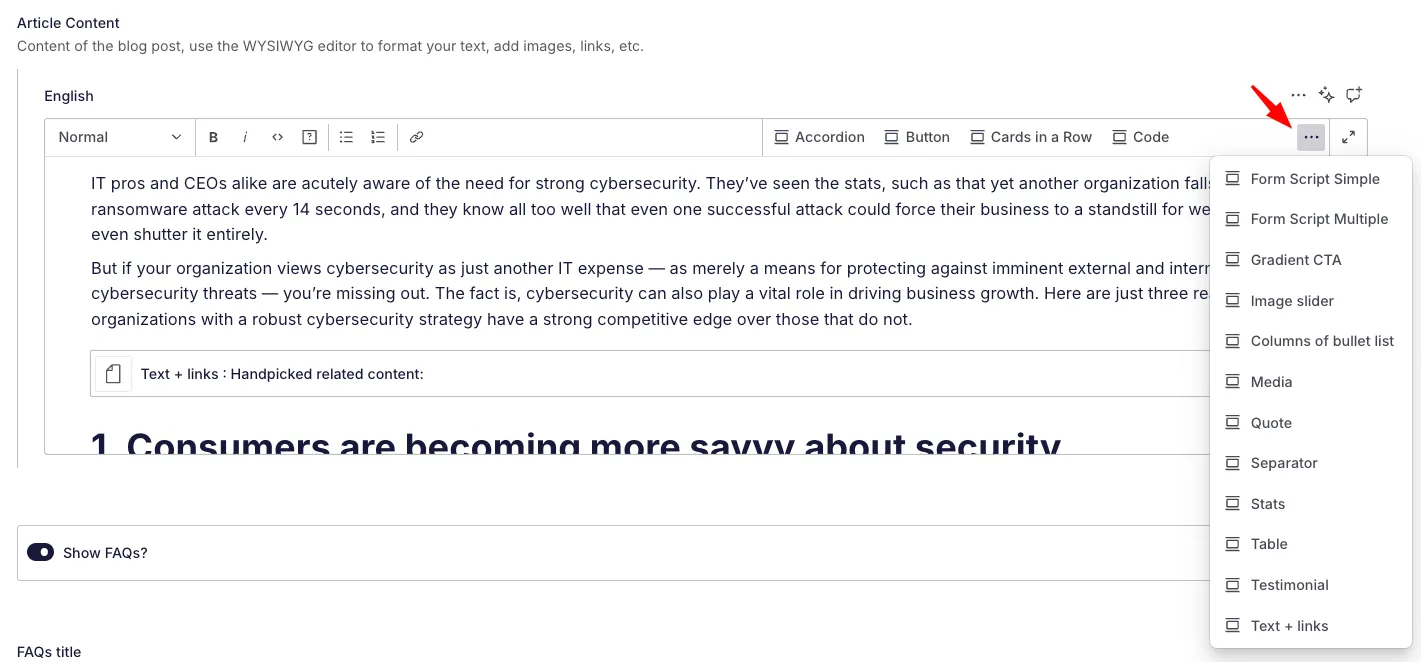
This means that the users can insert some of the modules we have available in the rest of the pages but inside the content of articles and other post types.
Full and simple versions
Section titled “Full and simple versions”Since the full version with all the custom modules loads a lot of code, we try to keep it to the simple version when the only thing the user requires is a way to put text formatting and links into the content.
For that, we use type: 'simple' when inserting the island in a post type:
...wysiwyg({ title: 'Hero Description', name: 'hero_description', type: 'simple', description: 'Description that will be shown on the top of the single pages after the hero title', }),If we want the full version, we don’t need to pass anything, it’s the default state of this island:
...wysiwyg({ title: 'Article Content', description: 'Content of the blog post, use the WYSIWYG editor to format your text, add images, links, etc.', }),Folder structure
Section titled “Folder structure”In the island/wysiwyg folder, we have the main configuration of the island and the extra types.
index.js contains the main configuration of the island, where we define the available types and we pass the island to our localizedIsland helper to make it translatable.
media-preview.jsx contains the custom component that shows previews of any image or video uploaded to the portable text editor.
superscript.jsx adds the <sup> tag that was not available in the original types.
table_wysiwyg.js contains a reduced wysiwyg version to be used inside tables that are created inside the editor. So, this would be effectively a portable text editor inside the main portable text editor, for the moments where users need to input links or text formatting in tables that they are creating inside the main editor.
types.js contains the basic types available inside the editor: text styles, separators and media.
Finally, the types folder contains a file for each custom block that is available inside the editor. Each of this files is creating an object inside our portable text that we will be able to insert later on.
For instance:
import {title} from '@island/title.js'import {text} from '@island/text.js'
export const quote = () => {  return {    type: 'object',    title: 'Quote',    name: 'quote',    fields: [        ...text({title: 'Quote Text',localized: false, rows: 3}),        ...title({title: 'Quote Name',localized: false}),    ],    preview: {      select: {        title: 'text',        subtitle: 'title',      },      prepare(selection) {        const {title, subtitle } = selection        return {          title: `Quote : ${title} ${subtitle?  `- ${subtitle}` :''}` || 'Quote',        }      },    },  }}
This is a custom quote block, that would introduce this object in our Portable text. When this gets processed in the frontend, we will have the quote name to pick up and apply concrete styles to the block.
Types (or custom blocks) available inside the editor
Section titled “Types (or custom blocks) available inside the editor”- Accordion
- Button link
- Cards in a row
- Code - you can modify included languages from inside the block’s configuration
- CTA
- Footnote
- Form script (simple and multiple)
- Gallery
- Gradient CTA
- Highlighted
- Image slider
- List CTA
- Quote
- Stats
- Table
- Testimonial
- Text and links
Each of these has its own custom file where you can edit the block. If you make any modifications here, remember to also make them in the frontend files corresponding to that block.
Inside the frontend project, you have two places with the wysiwyg code.
The query
Section titled “The query”You have the main query for this module in src/utilities/groq/wysiwyg.js and the query for the simple version in src/utilities/groq/wysiwyg_simple.js.
You’ll see that all the custom blocks are included in the query for the full version, like:
/** * Generates a GROQ query string for the 'wysiwyg' (What You See Is What You Get) field. * @returns {string} - A string template that defines the WYSIWYG content configuration, including content and estimated reading time in minutes. * * @example in a GROQ query * export function test_query() { *   return ` *     _type == 'test' => { *       "type": _type, *       ${wysiwyg()}, *       title, *     } *   `; * } */
import { button_link, asset } from "@utilities/groq/index.js";import { testimonial } from "@utilities/groq/reference/index.js";// @ts-ignoreexport default function wysiwyg(name = "wysiwyg", language = "en") {    return `    "content": ${name}.${language}[]{      _type == 'quote' => {        "_type": _type,        "quote": text,        "name": title,      },       _type == 'break' => {        "_type": _type,      },      _type == "media" => {        "_type": _type,        ...,        "asset": image.asset->url,        "alt": image.asset->alt,        'mediaType' : mediaType,        'magnified' : image.asset->magnified,        'internal_url': video {            'url': asset->url          }      },       _type == "image" => {        "_type": _type,        "asset": image->url,        'internal_url': video {            'url': asset->url          }      },        _type == "block" => {          ...,           markDefs[]{            ...,          _type == "link" => {            "slug": reference->attributes.slug,            "type" : reference->_type,            'language' : "${language}",            ...          }        }      },        ...      _type == 'cta' => {        "_type": _type,        "button_link": {${button_link({ localized: false, language, singleLabel: true })}},        "subtitle": subtitle,        "title": title      },      _type == "button" => {        "_type": _type,        "language" :"${language}",        "button_link": {${button_link({ localized: false, language, singleLabel: true })}},      },        ...    },    "estimatedReadingTime": round(length(pt::text(wysiwyg)) / 5 / 180)  `;}
The rendering
Section titled “The rendering”All of these blocks get rendered into the content module via helpers in the service folder, that take the values from the blocks and create the HTML to render.
For instance:
export default function stats ({ value }) { const { stats } = value; let statsHtml = `<div class="f--row f--gap-a f--sp-e">`; stats.forEach(stat => { statsHtml += ` <div class="f--col-4 f--col-tablets-12"> <div class="g--card-08 g--card-08--second"> <h3 class="g--card-08__item-primary">${stat.title}</h3> <div class="g--card-08__list-group"> <p class="g--card-08__list-group__item">${stat.text}</p> </div> </div> </div> `; }); return statsHtml + `</div>`;}You’ll find one of these for each custom block, and all of them flow into an index file where they get added to the standard renderings of the regular portable text editor:
const customComponents = {  marks: {    /**     * Handles internal and external links.     * - Internal links use `getUrl(value)` to resolve references.     * - External links use `value.href`.     */    link: ({ children, value }) => {      const rel = value.blank ? "noreferrer noopener" : "";      const target = value.blank ? "_blank" : "_self";
      // Handle internal reference (e.g., linked Sanity document)      if (value.reference && !value.option) {        const href = getUrl(value);        return `<a href=${href}>${children}</a>`;      }
      // Handle external link with or without options      if (value.href) {        return `<a href=${value.href} target="${target}" rel="${rel}">${children}</a>`;      }    },    ...  },
  // --- BLOCKS: paragraph-level elements like headings or footnotes ---  block: {    /**     * Headings (H2)     * - Generates a lowercase, hyphenated ID from the text (for anchors).     */    h2: ({ children }) => {      const html = Array.isArray(children) ? children.join('') : String(children);      const plainText = html.replace(/<[^>]+>/g, '').trim().toLowerCase();      const id = plainText        .replace(/[\u0300-\u036f]/g, "") // Remove accents        .replace(/\s+/g, "-")            // Replace spaces with hyphens        .toLowerCase();
      return `<h2 id="${id}">${html}</h2>`;    },    ...  },
  // --- TYPES: embedded custom components or structured blocks ---  types: {    accordion,    button,    code,    footnote,    form_script_multiple,    form_script_simple,    gradient_cta,    highlighted,    image_slider,    list_cta,    media,    quote,    stats,    table,    testimonial,    text_links,    cards_in_a_row,
    /**     * Horizontal rule     */    break: () => `<hr />`,  },};
export function sanityPortableText(portabletext) {  return portableTextToHtml(portabletext, customComponents);}
As you can see, all the marks, blocks and custom types are then passed to the Sanity function that will process the portable text coming from the backend and convert it into HTML for our frontend site.