Webinars workflow
🧩 Regions and languages logic
Section titled “🧩 Regions and languages logic”Webinars work a bit differently than the rest of the website in language management. Here, the languages go hand in hand with the region of the webinar, because each webinar has an associated video that has been translated into the language relevant to the region it belongs.
Each region has:
- An associated On24 / StealthSeminar link
- This implies a date and time adapted to the needs of that region
- An associated language (these are hardcoded and each region has one of the languages of the site)
- (Optional) Associated speakers
And each webinar can have as many regions as they need. For English language there are three regions available (Americas, Europe and Asia) because of time differences, so the webinars can be programmed to be live at convenient times for the users living in each of them.
All of these regions are selected from the Sanity backend:
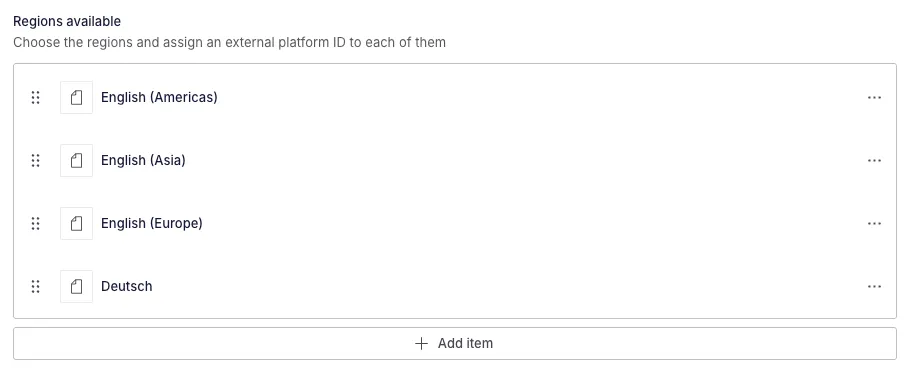
And are reflected in the front-end in several ways. Each webinar will display a region selector in its single page and the content will be displayed in the language associated to that region:

These are also reflected in the indexes where webinars appear and the user is geolocated to display the most relevant regions for them first. The time of the webinar is also localized to appear in the timezone of the user:
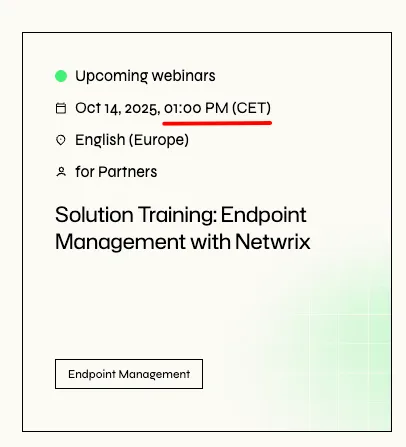
🌎 User geolocation
Section titled “🌎 User geolocation”We use whois to determine the user’s location and tailor the regional webinar content for them.
To do this safely, we use an API call from our Astro project and send the user’s IP to the service:
export const GET = async ({ request }) => { const ip = request.headers.get("x-forwarded-for")?.split(",")[0] || request.headers.get("x-real-ip") || request.headers.get("cf-connecting-ip") || request.headers.get("x-nf-client-connection-ip") || "8.8.8.8"; const result = await axios.get(`https://ipwhois.pro/${ip}?key=${import.meta.env.IP_WHO_IS_KEY}`); const response = new Response(JSON.stringify(result.data)); const origin = request.headers.get("origin"); return setCorsHeaders(response, origin);};This is a paid service, so we need the API key to be in our environment variables.
After locating the user, we can start using that location to our service in all webinar related content.
🗂️ Indexes and modules with webinar / podcasts cards
Section titled “🗂️ Indexes and modules with webinar / podcasts cards”To input the correct region information into the cards and adapt the time of the events to the timezone of the user we use the file UserLocation.js, a class that will take the information from our backend and process it to make the relevant adaptations. This will be a different process depending on where the information is coming from: we have one part of the service working with Sanity data and another one working with Algolia data, as they are structured a bit differently and we have indexes working with both of them.
All indexes use CardE to display webinars and podcasts.
This file also adapts the date and time of any other webinar card in the site:
- Featured resources module - CardF
- Featured resources slider module - CardF
- Featured post slider module - CardF
- Sessions list module - CardF
- Authors post list - CardE
Card F
Section titled “Card F”Card F receives the information from Sanity and stores all data relevant for our service in the type span:
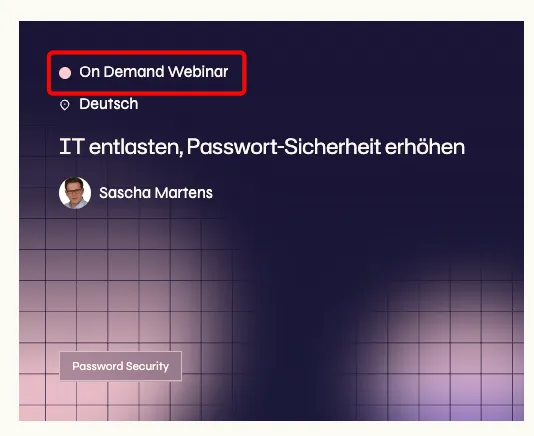
{ type && ( <span class="c--card-f__ft-items__hd__meta__item js--webinar-data" data-slug={link.slug} data-lang={language} data-webinar-type={typeSlug} data-region-param={regionParam} data-regions={JSON.stringify(regions)} > {is_product_demo ? "Product Demo" : type} </span> );}Card E
Section titled “Card E”Card E is usually rendered through Algolia (but can be rendered from Sanity data, as in Author page), and also stores the information in the type span. For podcasts index, as we do not have the type span available, we store it in an empty span:

{ type && typeName && ( <span class="c--card-e__ft-items__hd__meta__item js--webinar-data" data-slug={link.slug} data-lang={lang} data-webinar-type={type} data-regions={JSON.stringify(regions)} > {is_product_demo ? "Product Demo" : typeName} </span> );}{ type == "podcasts" && ( <span class="js--webinar-data" data-slug={link.slug} data-lang={lang} data-webinar-type={type} data-regions={JSON.stringify(regions)} ></span> );}Our UserLocation.js class needs the slug, the webinar type and the regions to adapt them to the user’s location.
UserLocation.js class process
Section titled “UserLocation.js class process”We start by getting the user information either from our API or from our session storage:
if (!this.userInformation) { this.userInformation = await getUserInformation(); sessionStorage.setItem("userInformation", JSON.stringify(this.userInformation));}With that, we get the region of the webinar either from a specific region given by our region parameter in the URL or we send the whole regions object to our helper to determine which region is better suited to the user:
if (this.regionParam) { const regionsObject = this.regions.filter((region) => region.value == this.regionParam); webinarRegion = getWebinarRegion({ webinar: { regions: regionsObject }, userLocation: this.userInformation?.userLocation, });} else { webinarRegion = getWebinarRegion({ webinar: { regions: this.regions }, userLocation: this.userInformation?.userLocation, });}export const getWebinarRegion = ({ webinar, userLocation }) => { if (!webinar?.regions?.length) return null; const matchedRegion = webinar.regions.find((region) => region.value === userLocation); if (matchedRegion) { return { id: matchedRegion.id || "", region: matchedRegion.value, regionDisplay: matchedRegion.label, webinarDate: matchedRegion.date ?? "", region_cid: matchedRegion.region_cid, }; }
// Fallback to "english-americas" if present const americasRegion = webinar.regions.find((region) => region.value === "english-americas"); if (americasRegion) { return { id: americasRegion.id || "", region: americasRegion.value, regionDisplay: americasRegion.label, webinarDate: americasRegion.date ?? "", region_cid: americasRegion.region_cid, }; }
// Final fallback: use the first available region const firstRegion = webinar.regions[0]; return { id: firstRegion.id || "", region: firstRegion.value, regionDisplay: firstRegion.label, webinarDate: firstRegion.date ?? "", region_cid: firstRegion.region_cid, };};For Algolia we can skip this process, as we will be rendering one card per each region because it is what we need to make the region filter functional:
const webinarRegion = this.regions;Once we have our region, we can start substituting the elemnents of our card with the time and date adapted to the user. If the webinar is recurring, we’ll need to get the first of the array of dates provided by StealthSeminar. These dates are updated every day through a CRON job in Sanity so the first date is always the closer to the current moment.
In this step we change:
- The date in the card, for recurring and upcoming webinars, and we show the timezone
- The name of the region in the card
- The URL where that card links - this is done so the user can enter the single page with the region preassigned and get the results from that region from the very beginning
setWebinarCard(webinarRegion) {    let webinarDateValue = webinarRegion.webinarDate;
    // Handle recurring webinars with multiple dates    if (this.webinarType === "recurring") {        webinarDateValue = webinarDateValue.split(",")[0];    }
    // Format date    const webinarDate = getWebinarDate({        webinarDate: webinarDateValue,        userTimeZone: this.userInformation?.userTimeZone,        lang: this.lang,    });
    // Update date element    if (this.DOM.dateElement) {        const showTimeZone = this.webinarType === "recurring" || this.webinarType === "upcoming";        this.DOM.dateElement.innerHTML = showTimeZone            ? `${webinarDate} (${this.userInformation?.userTimeZoneAbbr})`            : webinarDate;    }
    // Update region name    if (this.DOM.regionName) {        this.DOM.regionName.innerHTML = webinarRegion.regionDisplay;    }
    // Ensure URL has region param    const url = new URL(this.DOM.element.href);    if (!url.searchParams.has("region")) {        url.searchParams.set("region", webinarRegion.region);    }    this.DOM.element.href = url.toString();}
And we can use this method in both our options (Sanity and Algolia):
if (this.DOM.element && this.type == "sanity") {    let webinarRegion;
    if (this.regionParam) {        const regionsObject = this.regions.filter((region) => region.value == this.regionParam);        webinarRegion = getWebinarRegion({            webinar: { regions: regionsObject },            userLocation: this.userInformation?.userLocation,        });    } else {        webinarRegion = getWebinarRegion({            webinar: { regions: this.regions },            userLocation: this.userInformation?.userLocation,        });    }    if (webinarRegion) {        this.setWebinarCard(webinarRegion);    }}if (this.DOM.element && this.type == "algolia") {    const webinarRegion = this.regions;    if (webinarRegion) {        this.setWebinarCard(webinarRegion);    }}
📄 Webinar single page
Section titled “📄 Webinar single page”The webinar single page has several elements that will be manipulated according to the region of the user or the region they pick out.
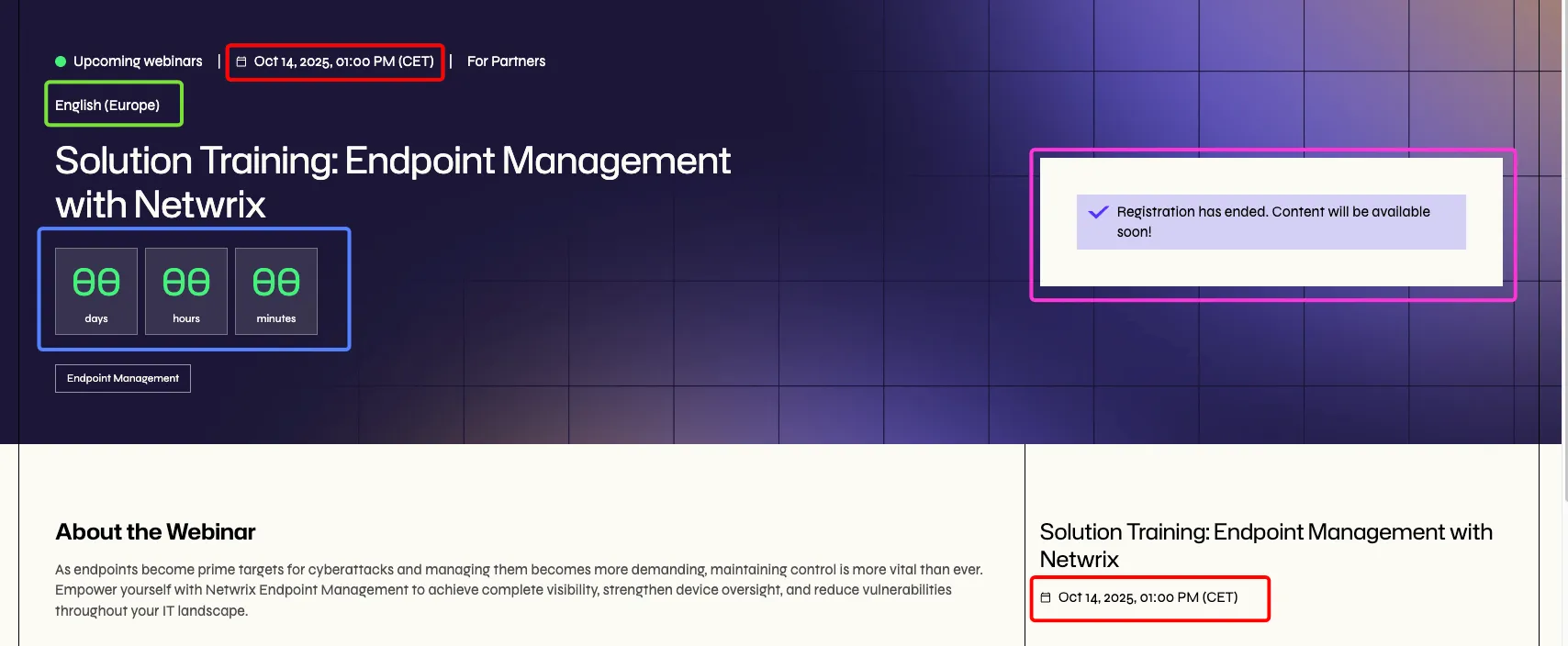
When the user enters the page, they usually will come with a region parameter in the URL, because they will come from a card in an index or module.
?region=english-europe
So in our WebinarSingle.js class:
First, we get the user location.
if (!this.userInformation) { this.userInformation = await getUserInformation(); sessionStorage.setItem("userInformation", JSON.stringify(this.userInformation));}Then, next thing is to get the webinar information from Sanity. We do this because we need the ID to make the petition to on24 / StealthSeminar and we do not want to leave that ID in the data attributes like we did for the regions in the indexes, for instance.
if (!this.webinar) {    const query = `*[(_type == 'webinars' || _type == 'podcasts') && attributes.slug == '${this.slug}'][0]{                                    'regions': repeater[]                                        {                                            'value': region->slug,                                            'id': text,                                            'label': region->title,                                            manual_date => {                                                date                                            },                                            manual_date != true => {                                                'date': webinar_date,                                            },                                            region_cid                                        },                                    'registration_text':  *[_type == 'global_singles'][0]{'text': webinars_registration_ended.${this.langParam}}                                    }`;
    this.webinar = await sanityClient.fetch(query);}
Once we have the webinar information, we can start by assigning a region to the webinar if it’s not in the URL already:
if (!this.regionParam) { const baseUrl = import.meta.env.PUBLIC_API_URL; if (this.webinar?.regions?.some((region) => region.value == this.userInformation?.userLocation)) { window.location.href = `${baseUrl}/${this.lang}/${this.slug}?region=${this.userInformation?.userLocation}`; } else if (this.webinar?.regions?.some((region) => region.value == "english-americas")) { window.location.href = `${baseUrl}/${this.lang}/${this.slug}?region=english-americas`; } else { window.location.href = `${baseUrl}/${this.lang}/${this.slug}?region=${this.webinar.regions[0].value}`; }}This assigns the region of the user first, if that is not available, it assigns English America, and if that is not available, it goes for the first region that the webinar has available.
Once the parameter for the region has been assigned, we will be assigning the cID from the backend of the webinar. Every webinar needs to send at least one, probably two cIDs to Marketo and Salesforce, so every webinar has a cID assigned in the backend and then the marketing teams can assign another cID for a specific campaign.
So if the URL already has a cID, we add the backend one, if not, we add the backend one as cID directly:
else {    const url = new URL(window.location.href);
    if (!url.searchParams.has("cID")) {        url.searchParams.set("cID", region.region_cid);        window.history.replaceState({}, "", url);    } else {        const cID = url.searchParams.get("cID");        if (cID != region.region_cid) {            url.searchParams.set("webinar_cID", region.region_cid);            window.history.replaceState({}, "", url);        }    }}
Once all of this is cleared up, our URL should contain all relevant params and we can continue with the replacement of the UI elements that need to.
First, we can check if the user has already sent the form to hide it during the session, because when they send the form the page reloads and it is confusing to still see the form as it was before sending:
const slugArray = this.slug.split("/");const isAlreadyRegistered = sessionStorage.getItem(slugArray[slugArray.length - 1]);if (this.DOM.nextDatesPicker && isAlreadyRegistered) { this.DOM.nextDatesPicker.remove();}After that, we can. get the webinar region from either the param or the user location:
const webinarRegion = getWebinarRegion({ webinar: this.webinar, userLocation: this.regionParam ?? this.userInformation?.userLocation,});And once we have the webinar region, we can start assigning values to the elements of the UI.
Upcoming
Section titled “Upcoming”First, we need to update the countdown element in the hero. For that, we send an event that will be listened by the countdown handler and will destroy the previous instance of the class and re-instance it:
if (this.DOM.countdownElement) { this.DOM.countdownElement.setAttribute("data-target", webinarRegion.webinarDate); this.emitter.emit("countdown-update", { date: webinarRegion.webinarDate });}this.emitter.on("countdown-update", (payload) => { if (this.DOM.countdownElements.length) { super.destroyInstances({ libraryName: "Countdown" }); } this.DOM = this.updateTheDOM; this.Manager.instances.Countdown = [];
super.assignInstances({ elementGroups: [ { elements: this.DOM.countdownElements, config: this.config, boostify: { distance: 30 }, }, ], });});Then we can get the date of the webinar and replace the date elements in the Hero and the sidebar:
const webinarDate = getWebinarDate({ webinarDate: webinarRegion.webinarDate, userTimeZone: this.userInformation?.userTimeZone, lang: this.langParam ?? this.lang,});// Replace HTMLif (this.DOM.dateElements.length) { this.DOM.dateElements.forEach((dateElement) => { const date = `${webinarDate} (${this.userInformation?.userTimeZoneAbbr})`; dateElement.innerHTML = date; });}And then, finally, we can hide the form if the webinar is Upcoming but the date has already passed. We do this because some time passes between the date of the webinar and the moment in which the webinar’s information is uploaded to Sanity and the status of the webinar is changed to On Demand, and we need to prevent users from registering to a webinar that has already passed and creating the wrong lead in Marketo and Salesforce.
const now = new Date();const webinarDateObject = new Date(webinarDate);if (now > webinarDateObject) { this.DOM.formElement.style.display = "none"; this.DOM.formTitle.style.display = "none"; this.DOM.formWrapper.insertAdjacentHTML( "beforeend", `<p class="c--form-success-a">${this.webinar.registration_text.text}</p>` );}this.DOM.formElement.setAttribute("data-webinar-date", region.date);Recurring
Section titled “Recurring”For recurring webinars, we need to get all of the dates coming from StealthSeminar (seven dates in total) and add them to the date selector above the form:
const webinarDatesArray = webinarRegion.webinarDate.split(",");webinarDatesArray.forEach((date) => { const displayDate = getWebinarDate({ webinarDate: date, userTimeZone: this.userInformation?.userTimeZone, lang: this.langParam ?? this.lang, }); const option = new Option(displayDate, date); if (this.DOM.nextDatesPicker && !isAlreadyRegistered) { this.DOM.nextDatesPicker.add(option); }});this.DOM.formElement.setAttribute("data-webinar-date", webinarDatesArray[0]);All types
Section titled “All types”For all webinars, we update the region picker or add the region text if the webinar only has one region available:
if (this.DOM.regionPicker) { this.DOM.regionPicker.value = this.regionParam ?? webinarRegion.region;} else if (this.DOM.regionText) { this.DOM.regionText.innerHTML = webinarRegion.regionDisplay;}And we emit an event to create the form in the Marketo handler:
this.emitter.emit("webinar-region-updated", { ...webinarRegion });🔽 Webinar pickers
Section titled “🔽 Webinar pickers”In all single pages with more than one region available, we have a region picker that allows us to change between the different versions of that webinar for each region. To control if the page should reload or only the elements inside it should, we use the class WebinarPickers.js.
In recurring webinars’ single pages we also have a date picker to get the date that is most interesting to the user from an array of dates provided by StealthSeminar. This class also controls the date picker for the recurring webinars.
The class assigns event listeners to both select elements and handles each case separately.
🌎 Region picker
Section titled “🌎 Region picker”First thing we have is a fallback to store the data for the regions we have already changed to, so we save some calls and some logic by reusing what we have stored in our class. Here we get this.regions, which is the object where we store all our information, and substitute the dates, reload the countdown and reload the form, also hiding it if the date of the webinar has already passed:
if (Object.keys(this.regions).includes(e.target.value)) { this.DOM.dateElements.length && this.DOM.dateElements.forEach((dateElement) => { dateElement.innerHTML = this.regions[e.target.value].date; }); this.DOM.countdownElement.setAttribute("data-target", this.regions[e.target.value].on24Date); this.emitter.emit("countdown-update", { date: this.regions[e.target.value].on24Date }); const now = new Date(); const webinarDateObject = new Date(this.regions[e.target.value].date); if (now > webinarDateObject) { this.DOM.formElement.style.display = "none"; this.DOM.formTitle.style.display = "none"; this.DOM.formWrapper.insertAdjacentHTML( "beforeend", `<p class="c--form-success-a">${this.webinar.registration_text.text}</p>` ); } else { this.DOM.formElement.style.display = "block"; this.DOM.formTitle.style.display = "block"; const registrationEndedElement = document.querySelector(".c--form-success-a"); registrationEndedElement.remove(); } this.emitter.emit("webinar-region-updated", { ...this.regions[e.target.value] });}If we do not yet have this information stored, we start by getting webinar information from Sanity:
if (!this.webinar) {    const query = `*[(_type == 'webinars' || _type == 'podcasts') && attributes.slug == '${this.slug}'][0]{                        'regions': repeater[]                            {                                'value': region->slug,                                'id': text,                                'label': region->title,                                manual_date => {                                    date                                },                                manual_date != true => {                                    'date': webinar_date,                                },                                region_cid                            },                            'registration_text':  *[_type == 'global_singles'][0]{'text': webinars_registration_ended.${this.langParam}}
                        }`;
    this.webinar = await sanityClient.fetch(query);}
Then we get the region and store it in our this.regions object:
const webinarRegion = getWebinarRegion({    webinar: this.webinar,    userLocation: e.target.value,});
this.regions = {    ...this.regions,    [e.target.value]: {        ...(this.regions?.[e.target.value] || {}),        ...webinarRegion,    },};
And once we have this, we can get the region language from a helper mapper inside utilities/js/GetLanguageFromRegion.js, to check if the language of the region we are picking is the same as the language we are already in. If so, we do not need to reload the page. If the language changes, we reload the page to load all the elements again in the language of the webinar:
const regionLanguage = getLanguageFromRegion(webinarRegion.region);if (regionLanguage != this.langParam) { const baseUrl = import.meta.env.PUBLIC_API_URL; window.location.href = `${baseUrl}/${this.lang}/${this.slug}?region=${webinarRegion.region}`; return;}If we stay in the same page because the language has not changed, we need to change the URL to get the new region there and the cID corresponding to that region, and reload the form:
const url = new URL(window.location.href);url.searchParams.set("region", webinarRegion.region);
if (!url.searchParams.has("cID")) {    url.searchParams.set("cID", webinarRegion.region_cid);} else {    if (url.searchParams.has("webinar_cID")) {        const cID = url.searchParams.get("webinar_cID");        if (cID != webinarRegion.region_cid) {            url.searchParams.set("webinar_cID", webinarRegion.region_cid);        }    } else {        const cID = url.searchParams.get("cID");        if (cID != webinarRegion.region_cid) {            url.searchParams.set("cID", webinarRegion.region_cid);        }    }}window.history.replaceState({}, "", url);// Update form with regionthis.emitter.emit("webinar-region-updated", { ...webinarRegion });
After this, we can start re-rendering the elements of the page according to the user’s region:
if (!this.userInformation) { this.userInformation = await getUserInformation(); sessionStorage.setItem("userInformation", JSON.stringify(this.userInformation));}Upcoming webinar
Section titled “Upcoming webinar”First, we re-load the countdown, same as we did in WebinarSingle.js:
this.DOM.countdownElement.setAttribute("data-target", webinarRegion.webinarDate);this.emitter.emit("countdown-update", { date: webinarRegion.webinarDate });Then, we can replace the date and hide the form if the date has passed. We store everything in our this.regions object to reuse if needed:
const webinarDate = getWebinarDate({    webinarDate: webinarRegion.webinarDate,    userTimeZone: this.userInformation?.userTimeZone,    lang: this.lang,});// Add to regions to avoid fetching it againthis.regions = {    ...this.regions,    [e.target.value]: {        ...(this.regions?.[e.target.value] || {}),        date: webinarDate,    },};// Replace HTMLif (this.DOM.dateElements.length) {    this.DOM.dateElements.forEach((dateElement) => {        dateElement.innerHTML = `${webinarDate} (${this.userInformation?.userTimeZoneAbbr})`;    });}const now = new Date();const webinarDateObject = new Date(webinarDate);
if (now > webinarDateObject) {    this.DOM.formElement.style.display = "none";    this.DOM.formTitle.style.display = "none";    this.DOM.formWrapper.insertAdjacentHTML(        "beforeend",        `<p class="c--form-success-a">${this.webinar.registration_text.text}</p>`    );} else {    this.DOM.formElement.style.display = "block";    this.DOM.formTitle.style.display = "block";    const registrationEndedElement = document.querySelector(".c--form-success-a");    registrationEndedElement.remove();}
Recurring webinars
Section titled “Recurring webinars”For recurring webinars, we need to clean the date picker first from the previous dates. Then, we need to get the new dates and put them inside the date picker as options and get the first one to the form straight away. This will be used to make the registration in StealthSeminar:
const webinarDatesArray = webinarRegion.webinarDate.split(",");if (this.DOM.datePicker) {    this.DOM.datePicker[0].innerHTML = "";}
webinarDatesArray.forEach((date) => {    const displayDate = getWebinarDate({        webinarDate: date,        userTimeZone: this.userInformation?.userTimeZone,        lang: this.langParam ?? this.lang,    });    const option = new Option(displayDate, date);    if (this.DOM.datePicker) {        this.DOM.datePicker[0].add(option);    }});this.DOM.formElement.setAttribute("data-webinar-date", webinarDatesArray[0]);
📆 Date picker
Section titled “📆 Date picker”With the date picker, the only thing we need to do is to change the date that we are sending to the form:
if (this.DOM.formElement) { this.DOM.formElement.setAttribute("data-webinar-date", e.target.value);}🖥️ Integration with On24 and StealthSeminar
Section titled “🖥️ Integration with On24 and StealthSeminar”Upcoming webinars are integrated directly with On24 and recurring webinars with StealthSeminar.
These two platforms are where the webinars are created and hosted at, and we have integrated our forms to register users directly at these platforms from our site.
This integration is done through Marketo forms.
To avoid showing the ID of any of the platforms in the client, we manage this via events. So when we emit the event that loads the form:
this.emitter.emit("webinar-region-updated", { ...webinarRegion });We attach the entire webinar region there, and that contains the ID needed to make the API call to the platform to register the users.
We have a file called registration.js inside the Marketo folder that holds both the On24 and the StealthSeminar API calls:
export const on24 = async (region, values) => {    try {        const response = await axios.post(`${import.meta.env.PUBLIC_API_URL}/api/v1/register_on24_webinar/`, {            region,            values,        });        return response;    } catch (e) {        console.error({ error: "ERROR REGISTERING USER TO ON24", data: e });    }};
export const stealthSeminar = async (information) => {    const body = {        start_time: information.date,        name: `${information.FirstName} ${information.LastName}`,        email: information.Email,        region: information.region,    };    try {        const response = await axios.post(            `${import.meta.env.PUBLIC_API_URL}/api/v1/register_stealth_seminar_webinar/`,            body        );        return response;    } catch (e) {        console.log({ error: "ERROR REGISTERING USER TO STEALTH SEMINAR", data: e });    }};
These are called inside the Marketo handler in the configWebinarsWithRegister:
try {    if(${webinarType === "upcoming"}) await window.on24(${this.region || null}, values)    if(${webinarType === "recurring"}) await window.stealthSeminar({...values, date: '${date}', region: '${this.region || null}'})
} catch (error) {    console.error('Error in webinar registration:', error);}
More information on forms here.
🙏🏻 Thank you pages
Section titled “🙏🏻 Thank you pages”Thank you pages for webinars are integrated in Sanity in the same document as the webinar, and can be found in the attributes section:
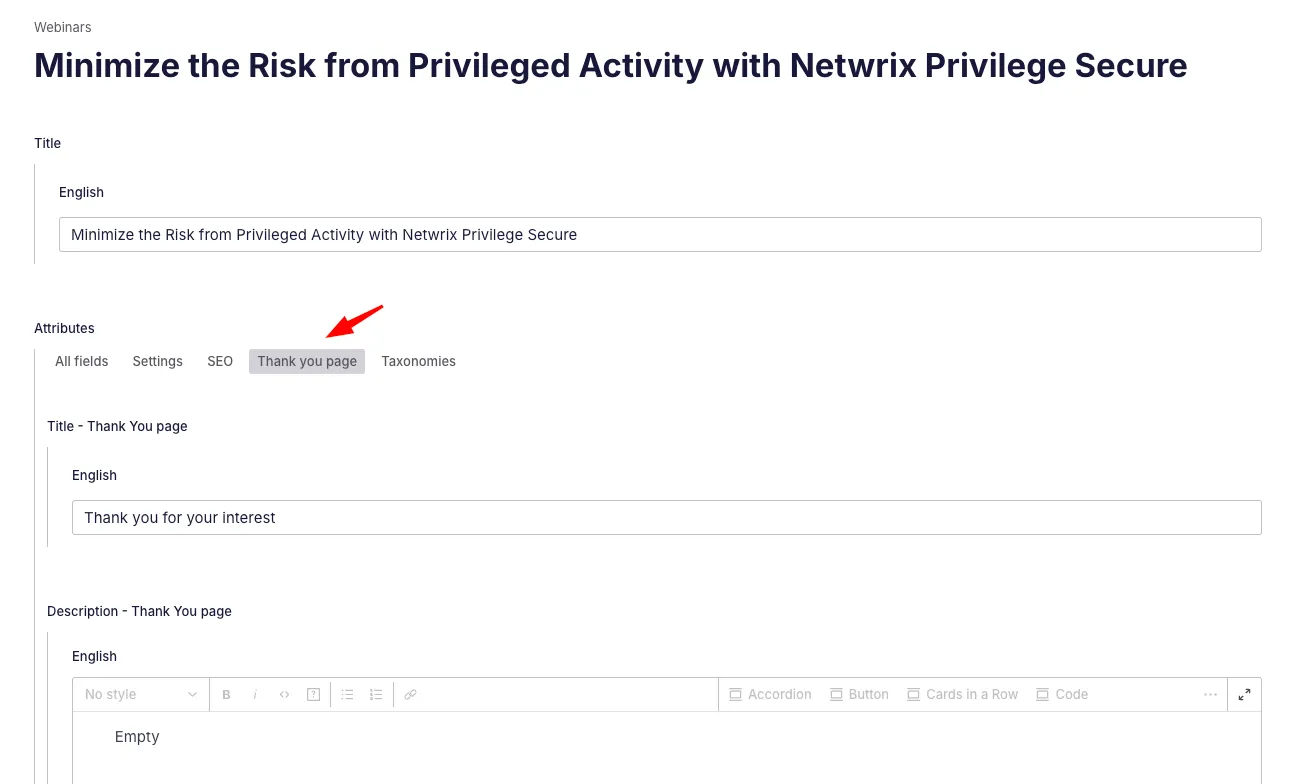
This was done because thank you pages are usually short in content and need to be matched with the translations available to the webinar, so the easiest way was to lump them together in one document.
This means that, in the frontend, we have a separate URL for our thank you page that uses the same slug as our webinar: netwrix.com/en/resources/webinar/thank-you/[slug] and we will use a specific query to retrieve the information we need for this other “single” page:
export const thank_you = ({ language, langParam, isReference = false }) => {    return isReference        ? `    {reference->webinar_type->slug == 'on-demand' =>        {            'session_title': reference->title.${langParam ?? language},            'video' :{${asset({ name: "reference->attributes.thank_you_video", localized: true, language: langParam ?? language })}},            ...        }    }    `        : `        {(webinar_type->slug == 'on-demand' || _type == 'podcasts') =>        {            'title': attributes.thank_you_title.${langParam ?? language},            'video' :{${asset({ name: "attributes.thank_you_video", localized: true, language: langParam ?? language })}},            'description': {${wysiwyg('attributes.thank_you_description', langParam ?? language)}},            ...
        }    }    `;};
This query has two parts, first, we check if we’re calling this query from a place where it’s a reference, and this would apply to webinar series single pages. Webinar series display all thank you pages from their webinars one below the other, so they need to retrieve the thank you page information from the references to all those webinars:
export const webinar_series = ({ language, langParam }) => { return ` 'title': title.${langParam ?? language}, 'description': {${wysiwyg_simple({ name: "wysiwyg", language: langParam ?? language })}}, 'sessions': sessions[]{ 'title': reference->title.${langParam ?? language}, ... 'thank_you':${thank_you({ language, langParam, isReference: true })}, }, ... `;The other part works to retrieve a thank you page for a single page webinar, where it’s not a reference to anything, it’s just its own thank you page:
export const webinar = ({ langParam, language }) => { return ` 'title': title.${langParam ?? language}, 'regions': repeater[]{ 'label': region->title, 'value': region->slug, 'id': text, region_cid, manual_date => { date }, manual_date != true => { 'date': webinar_date, } }, ... 'thank_you':${thank_you({ language, langParam})}, ... `;};📦 Webinar series
Section titled “📦 Webinar series”Webinar series contain more than one on-demand or upcoming webinar (never recurring webinars) and can be of three types:
- All its webinars are on-demand -> the series is on-demand, when the form is filled in its single page, no registration is sent out, all thank you pages are shown one below the other in a general thank you page for the series
- At least one webinar is upcoming -> the series is mixed, form will send out registrations to On24 for all upcoming webinars and if the user wants to see the thank you pages of the on-demand ones, they will need to go to that specific webinar and access it
- All webinars are upcoming -> the series is upcoming, form will send out all registrations to On24 sequentially
Series dates and registration are controlled by files very similar to the ones controlling singles for webinars: WebinarSeriesSingle.js and WebinarSeriesPicker.js and they have a dedicated Marketo section with a loop that sends as many registrations as needed.
The only difference is that the WebinarSeriesPickers.js file always reloads the page when changing region, because a series can contain webinars from different regions and should only show those belonging to the selected region.
We reload and show only the ones relevant to the shown region.