Resource Center
Resource Center Overview
Section titled “Resource Center Overview”The Resource Center uses Algolia to power its search and filtering system. The module responsible for this is PostList.astro, which assigns a specific handler class based on the page configuration:
| Page Option | CSS Class | Handler |
|---|---|---|
| Center (Resource Center) | js--algolia | Algolia.js |
| Guides | js--guides-list | Guides handler |
| Other | js--index-list | Index list handler |
The handler for the Resource Center is located at: scripts/handlers/post_list/Algolia.js
DOM Elements
Section titled “DOM Elements”The Algolia.js handler initializes by querying the required DOM elements:
this.DOM = { inputSearch: document.querySelector(".js--search-resources"), loadMoreBtn: document.querySelector(".js--load-more-resources"), resultsContainer: document.querySelector(".js--resources-result"), noResultsFound: document.querySelector(".js--no-results-found"), loadingContainer: document.querySelector(".js--loading"), mainContainer: document.querySelector(".js--results-container"), loadMoreContainer: document.querySelector(".js--load-more-container"), translateDownload: document.querySelector(".js--download")?.value, translateLearnMore: document.querySelector(".js--learn-more")?.value, translateDownloadTitle: document.querySelector(".js--download-modal-title")?.value,}Calling the Algolia API
Section titled “Calling the Algolia API”To retrieve filtered results, the frontend sends a GET request to the /api/v1/Algolia endpoint. This endpoint acts as a proxy that receives all selected filters and builds the correct Algolia query.
const response = await axios.get("/api/v1/Algolia", { params: { searchTerm: this.searchTerm, selectedTypes: this.selectedTypes, selectedTopics: this.selectedTopics, selectedSolutions: this.selectedSolutions, selectedProducts: this.selectedProducts, selectedTechnology: this.selectedTechnology, selectedCompliance: this.selectedCompliance, selectedIndustry: this.selectedIndustry, language: this.language, currentPage: this.currentPage, hitsPerPage: this.hitsPerPage, selectedEvents: true, isResources: true }, headers: { "Content-Type": "application/json", },});Available filter parameters:
| Parameter | Description |
|---|---|
searchTerm | Free-text search query |
selectedTypes | Content type filter (blog, guide, etc.) |
selectedTopics | Topic taxonomy filter |
selectedSolutions | Solution taxonomy filter |
selectedProducts | Product taxonomy filter |
selectedTechnology | Technology taxonomy filter |
selectedCompliance | Compliance taxonomy filter |
selectedIndustry | Industry taxonomy filter |
language | Current site language |
currentPage | Pagination page number |
hitsPerPage | Results per page |
Rendering Results
Section titled “Rendering Results”The response from Algolia is rendered via a server-side Astro component:
try { const res = await fetch("/api/v1/render-content/", { method: "POST", headers: { "Content-Type": "application/json" }, body: JSON.stringify({ data: data, language: this.language, resultsTotal: resultsTotal, translateDownload: this.DOM.translateDownload, translateLearnMore: this.DOM.translateLearnMore, translateDownloadTitle: this.DOM.translateDownloadTitle, isResources: true }), }); const renderResult = await res.json(); result = renderResult.result || "";} catch (err) { console.error("Error en fetch render-content:", err);}URL Parameter Mapping
Section titled “URL Parameter Mapping”Filters are read from the URL and applied to the corresponding checkboxes on page load. This allows shareable filtered URLs.
this.searchTerm = url.searchParams.get("s") || "";this.selectedTypes = url.searchParams.get("type") || "";this.selectedTopics = url.searchParams.get("topic") || "";this.selectedProducts = url.searchParams.get("product") || "";this.selectedSolutions = url.searchParams.get("solution") || "";this.selectedTechnology = url.searchParams.get("technology") || "";this.selectedCompliance = url.searchParams.get("compliance") || "";this.selectedIndustry = url.searchParams.get("industry") || "";URL parameter mapping:
| URL Parameter | Filter Variable |
|---|---|
?s= | searchTerm |
?type= | selectedTypes |
?topic= | selectedTopics |
?product= | selectedProducts |
?solution= | selectedSolutions |
?technology= | selectedTechnology |
?compliance= | selectedCompliance |
?industry= | selectedIndustry |
Checkboxes are automatically marked based on URL parameters:
Object.entries(filters).forEach(([key, selector]) => { if (this[key]) { this[key].split(",").forEach((value) => { const checkbox = document.querySelector( `${selector} .c--filter-a__list-group__item__icon[value="${value}"]` ); if (checkbox) { checkbox.checked = true; checkbox.dispatchEvent(new Event('change')); } }); }});Event Listeners
Section titled “Event Listeners”Filter Change
Section titled “Filter Change”When any filter checkbox changes, the search is re-executed:
checkboxes.forEach((checkbox) => checkbox.addEventListener("change", updateResults));Load More
Section titled “Load More”The “Load More” button increments the page and fetches the next batch of results:
this.DOM.loadMoreBtn?.addEventListener("click", async (e) => {    window.toggleSpinner({ direction: "up" });    e.preventDefault();
    this.currentPage = this.currentPage + 1;    await this.searchAlgolia();
    window.toggleSpinner({ direction: "down" });});
Search Input
Section titled “Search Input”Search input uses a debounce (2500ms) to avoid excessive API calls:
this.DOM.inputSearch.addEventListener("keyup", async (event) => {    window.toggleSpinner({ direction: "up" });
    this.currentPage = 0;    this.total = 0;    this.filter = true;    event.preventDefault();
    this.searchTerm = event.target.value;
    await debounce(this.searchAlgolia(), 2500);    this.setURL();
    window.toggleSpinner({ direction: "down" });});
All three actions (search, filter, load more) call the same searchAlgolia() function.
Backend Query Execution
Section titled “Backend Query Execution”The searchAlgolia function on the backend builds the Algolia filter expression and executes the search:
console.log(request[0].filters);
try {    const response = await client.search({ requests: request })        .then((data) => data.results[0]);
    return new Response(        JSON.stringify({ data: response.hits, results: response.nbHits }),        { status: 200, headers: { "Content-Type": "application/json" } }    );} catch (err) {    console.error("Unexpected error:", err);    return new Response(        JSON.stringify({ error: err }),        { status: 500, headers: { "Content-Type": "application/json" } }    );}
Filter Expression Examples
Section titled “Filter Expression Examples”All filters operate exclusively using slugs, not titles. This ensures consistent filtering across languages.
Example 1 — Filter by Type + Topic
Section titled “Example 1 — Filter by Type + Topic”Filters applied:
- Type: Blog
- Topic: Audit
Generated URL: ?topic=audit&type=blog
Algolia filter expression (console output):
(type:"blogs" OR type:"all")AND (topics_slug:"audit" OR topics_slug:"all")AND NOT audiences_slug:"partners"| Filter | Expression | Purpose |
|---|---|---|
| Type | type:"blogs" | Restricts to blog posts |
| Topic | topics_slug:"audit" | Filters by topic slug |
| Fallback | OR ..:"all" | Keeps items without a specific value valid |
| Exclusion | NOT audiences_slug:"partners" | Always excludes partner-only content |
Example 2 — Filter by Type + Topic + Solution + Technology
Section titled “Example 2 — Filter by Type + Topic + Solution + Technology”Filters applied:
- Type: Blog
- Topic: Audit
- Solution: Identity Management
- Technology: Active Directory
Generated URL: ?topic=audit&type=blog&solution=identity-management&technology=active-directory
Algolia filter expression:
(solutions_slug:"identity-management" OR solutions_slug:"all")AND (type:"blogs" OR type:"all")AND (topics_slug:"audit" OR topics_slug:"all")AND (technology_slug:"active-directory" OR technology_slug:"all")AND NOT audiences_slug:"partners"The query becomes more specific as more filters are selected. All fields use slugs for consistency.
Visual Comparison
Section titled “Visual Comparison”Algolia Dashboard View
Section titled “Algolia Dashboard View”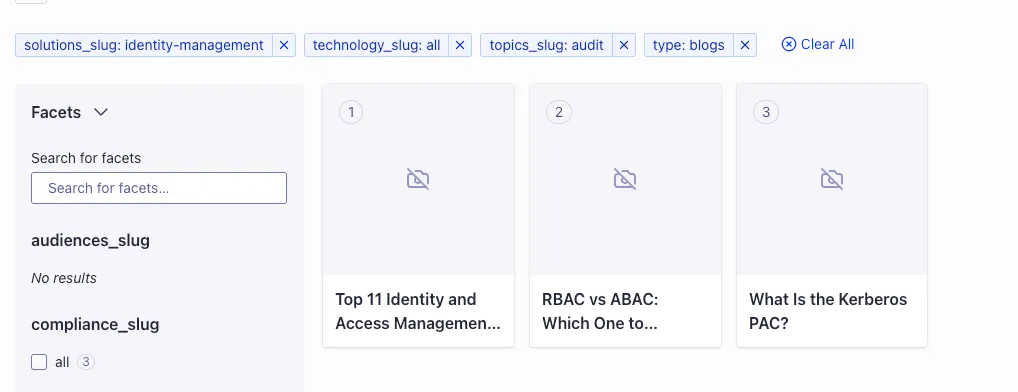
Resource Center on the Website
Section titled “Resource Center on the Website”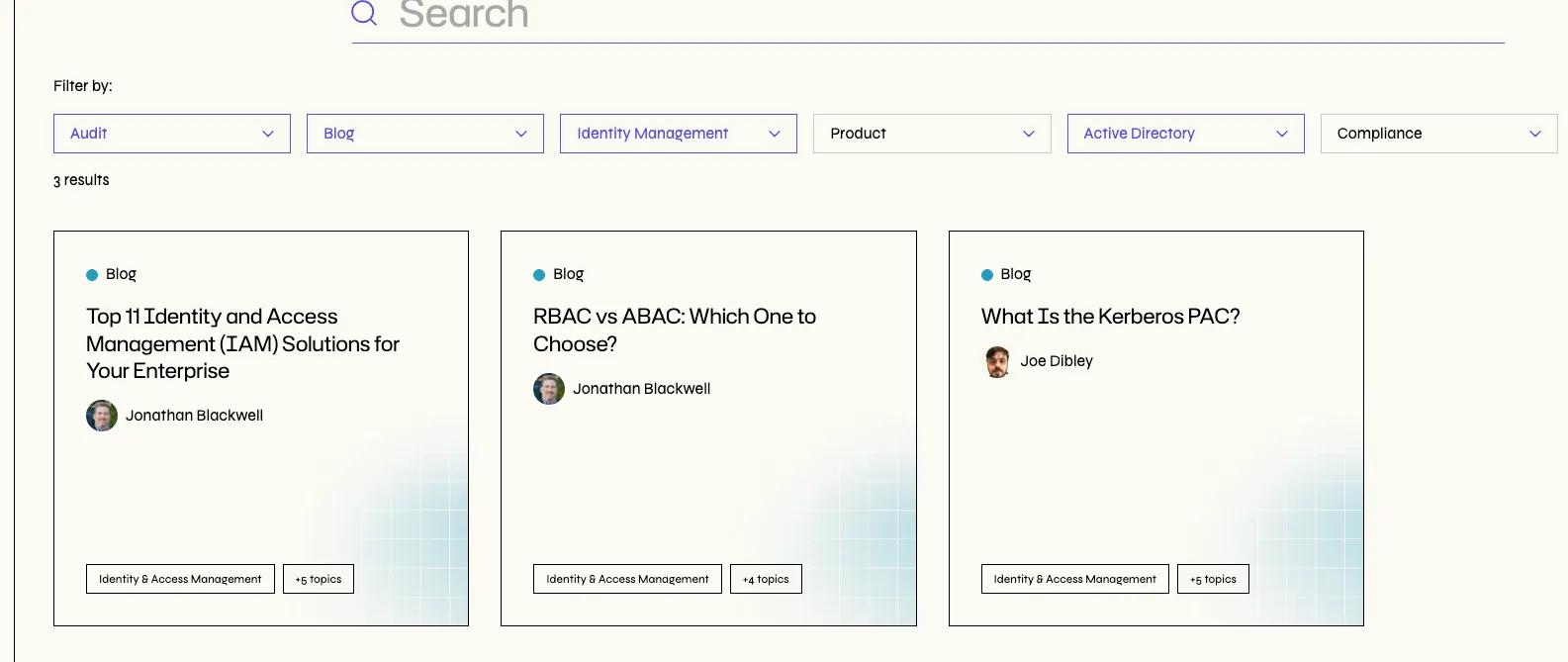
Summary
Section titled “Summary”- All Resource Center filters use slugs, not titles.
- URLs reflect the chosen filters using slug values, enabling shareable links.
- Algolia uses a consistent query pattern:
(field_slug:"value" OR field_slug:"all") - Partner-only content is always excluded with
NOT audiences_slug:"partners".